
Blender File Formats Explained: Which to Use and When
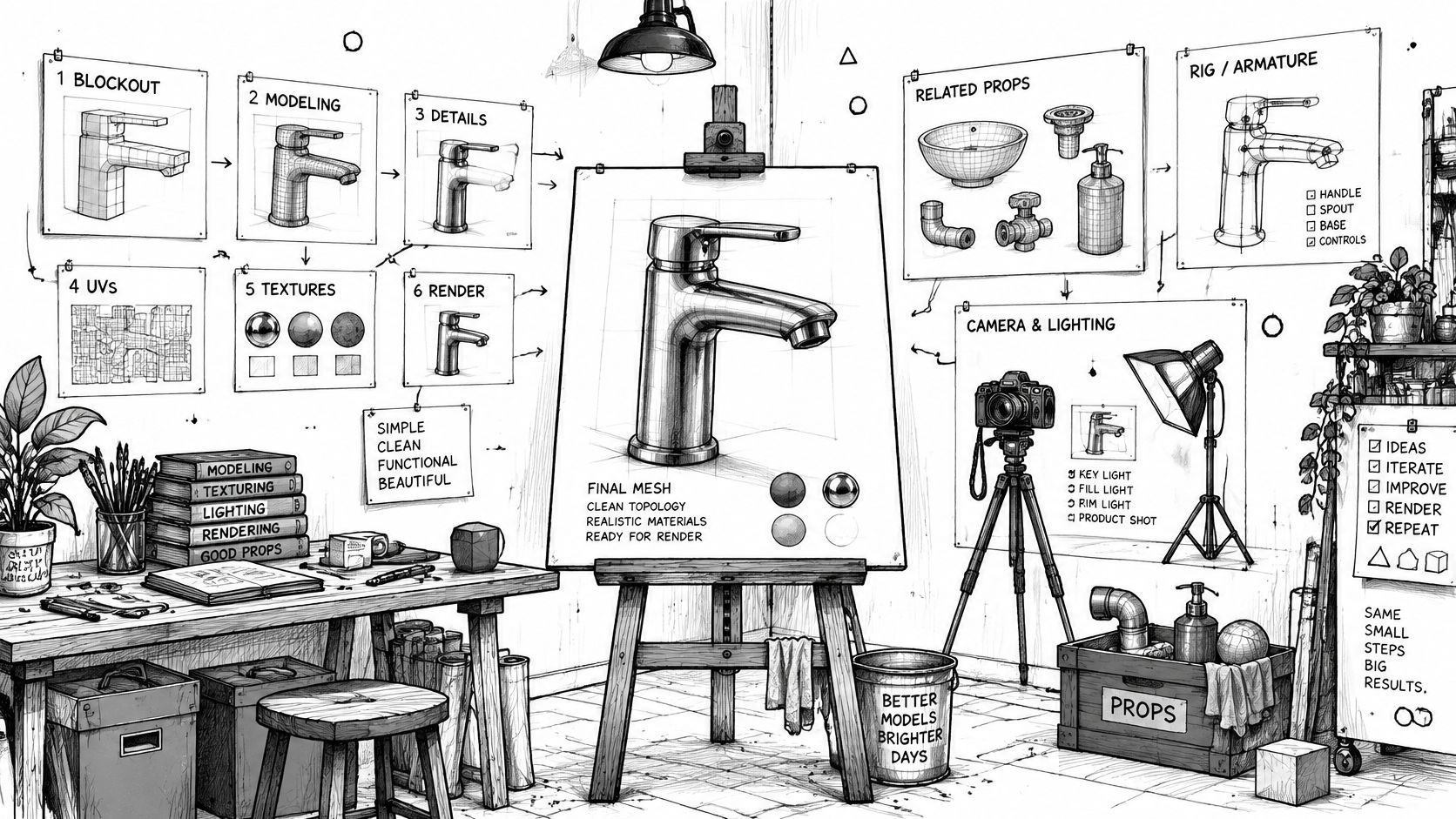
Most format guides tell you to pick the popular extension and export. That advice is how a clean scene turns into a broken handoff. A file that looks right in one viewport can arrive without the rig, the shader, the units, or the animation the next person needs. Blender file formats are a handoff problem first. Each one keeps a different slice of the scene, and a version change can rewrite the native file even when it still opens.
Treat the choice as a question about the next tool, not about which name shows up most often in a forum poll. A game engine, a slicer, a web viewer, and another artist on an older Blender build do not want the same package.
Table of Contents
- Blender File Formats at a Glance
- How the Native .blend File Stores a Scene
- Interchange Formats and What Each One Keeps
- Version Compatibility and Safe Handoffs
- Compressed and Packed .blend Files
- Examples from Modeling to Rendering and Delivery
- Pick the Format for Each Stage Before You Export
Blender File Formats at a Glance
Keep the native .blend while you are still editing and archiving. Use an exchange format for anything that leaves Blender. The working file holds the edit history. The delivery file holds only what the next application can read.
| Format | Extension | Type | Typical use |
|---|---|---|---|
| Blender native | .blend | Native project container | Editing and archiving full scenes |
| Wavefront OBJ | .obj | Mesh exchange | Static meshes with UV maps and basic materials |
| Autodesk FBX | .fbx | Interchange | Rigged characters and animation for game engines |
| glTF 2.0 | .gltf, .glb | Runtime standard | Web, AR and real-time PBR assets |
| STL | .stl | Mesh for fabrication | 3D printing and CNC work without color |
| Stanford PLY | .ply | Mesh with vertex data | Scanned meshes and vertex colors |
| Universal Scene Description | .usd, .usdc, .usdz | Scene interchange | Large scenes, pipelines and AR on Apple devices |
| Alembic | .abc | Baked animation cache | Simulated or deformed geometry frame by frame |
| Collada | .dae | Legacy interchange | Deprecated since Blender 4.2 and removed in Blender 5.0 |
| 3MF | .3mf | Print exchange | Colored and unit-aware 3D printing jobs |
Scan the Type column before you export. Native means "come back and keep editing." Exchange means "this trip is one way, and something will be left behind."
Collada should not enter a new pipeline. Blender 4.5 LTS is the last release that still ships the importer and exporter, and Blender 5.0 removes it. A .dae you can open today is a legacy receipt, not a format to standardize on.
A practical order for any asset is simple. Save the native container while the scene is alive. Export the exchange file the downstream tool can read. Then check versions, compression, and dependencies before anyone else opens the package.
How the Native .blend File Stores a Scene
A finished mesh is a photograph. A .blend is the studio: lights, props, camera marks, and the notes on how each piece was built. You can reprint the photograph anywhere. You can only keep working in the studio if you still have the stands, the gels, and the shot list.
What one file actually holds
The Blender manual on blend compatibility describes a .blend as a native project container, not a generic mesh exchange. It preserves objects, datablocks, materials, modifiers, animation, and application settings. That is why a complex scene can continue without a rebuild.
In practice that richness shows up as editability.
- Modifier stacks stay live. A Subdivision Surface or Boolean is still a setting you can change, not a frozen mesh.
- Shader networks stay wired. The Principled BSDF, image textures, and mix nodes remain connected to the object that uses them.
- Curves, cameras, and lights travel with the scene. Keyframes and render settings are part of the file, not a sidecar you hope someone remembered.
A faucet blockout can move from a cube, through bevels and a mirror modifier, into a shaded beauty render, and the same file still lets you undo a bad proportion. An OBJ of that faucet cannot.
The cost of that richness
The same binding that makes the studio useful makes the file a poor courier. Blender generally opens files from older versions, yet major-version changes can make files fully incompatible with older releases. The file is tied to the Blender generation that wrote it.
Practical rule: Keep one canonical .blend per asset only when someone still needs to edit it in Blender, and put an interchange file beside it for everyone else.
Record the target Blender version in the same note as the asset name. Do not treat a resave in an older build as a free translation. Unsupported modifiers, shader behavior, geometry nodes, and render settings can change even when the file opens. A handoff that respects that limit includes a tested preview, a dependency check, and a version-pinned archive of the original.
Interchange Formats and What Each One Keeps
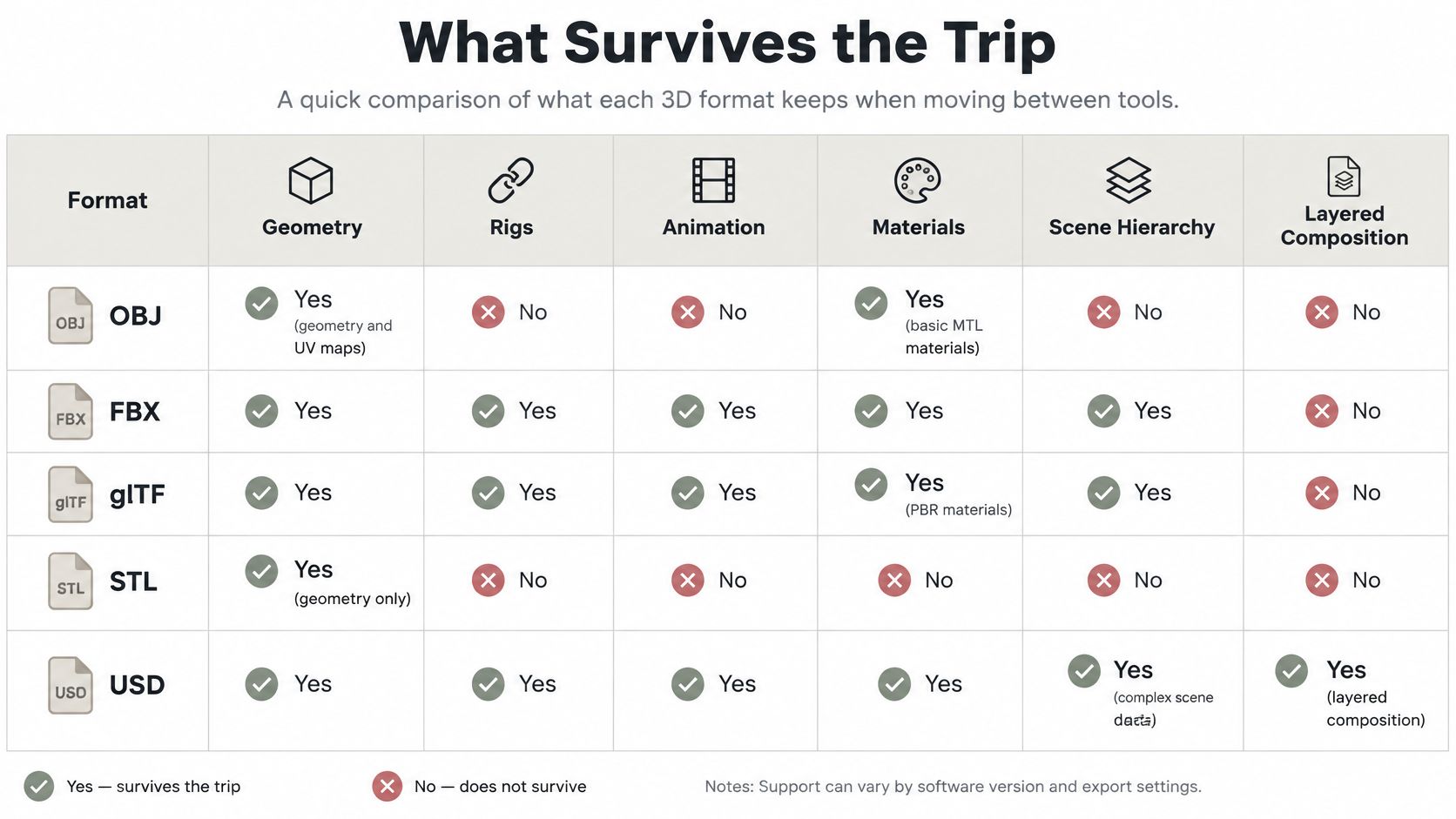
Choose the exchange format by what must survive the trip. Popularity rankings of BLEND, OBJ, FBX, glTF, and USD skip that question, and they go stale as Blender's own exporters change.
What survives the trip
| Format | Geometry | Materials | Animation |
|---|---|---|---|
| OBJ | Yes | Basic MTL materials and UV maps | No rigs or keyframes |
| FBX | Yes | Materials and textures | Keyframes and rigs |
| glTF / GLB | Yes | PBR materials | Keyframes, skins and morph targets |
| STL | Yes | None | None |
| PLY | Yes | Vertex colors only | None |
| USD / USDZ | Yes | Shader networks across scenes | Animation and scene hierarchy |
| Alembic | Yes, stored per frame | Not a material format | Baked geometry per frame |
OBJ is the static-mesh courier. UVs and a basic MTL file come along. Rigs and keyframes do not. It is a solid choice when a CAD or DCC tool only needs the surface, which is why a Blender to OBJ export is worth a dedicated check of scale and smoothing groups.
FBX is the game-engine package. Materials, textures, skeletons, and keyframes are the point of the format. Custom Blender properties and geometry-node setups are not.
glTF and GLB are the runtime pair. PBR materials, skins, morph targets, and keyframes fit in a compact file that web and AR viewers expect. GLB packs the textures inside one binary. glTF often leaves them as separate files you must not forget to zip.
STL keeps triangles and nothing else. That is a feature for a slicer and a failure for a shaded review. PLY adds per-vertex color, which is why scan cleanup often starts there and then moves to a material format.
USD and USDZ carry hierarchy, shaders, and animation across larger pipelines, including AR packages aimed at Apple devices. Alembic stores the mesh as it exists on each frame. Cloth, fluids, and deformed characters survive. The rig that made them does not.
Exports are moving targets
The Blender 4.5 LTS release notes record two shifts that change archives. Collada import and export have been deprecated since Blender 4.2, and 4.5 is the final supported release before removal in Blender 5.0. The same release writes Principled BSDF materials as OpenPBR Surface on MaterialX export.
A shader that looks correct in Blender can map to a different surface model in the next tool. Materials, modifiers, cameras, units, and custom properties do not line up one to one across game engines, DCC apps, and manufacturing software.
A picture that matches is not a backup. Re-import the export into a clean scene and check materials, scale, units, and custom properties before you delete the source.
Version Compatibility and Safe Handoffs
A file that opens in another Blender version is not necessarily a safe handoff. Compatibility is mostly one-way: an older release may open a newer file while losing features or changing how data behaves.
The Blender 4.0 compatibility notes describe backward compatibility and warn that opening a newer file in an older release can drop features. Major-version changes can also make files incompatible. Treat any older-version conversion as a test, not a guaranteed route back.
Four actions, four different outcomes
Opening, appending, linking, and resaving each handle scene data differently. Choose the operation based on what the recipient needs, then inspect the result.
| Action | What happens | Main risk | Safe practice |
|---|---|---|---|
| Open a newer file in an older release | The file may open with some data loaded | Features or data may be lost or changed | Open a copy, never the original |
| Test a newer file in an older Blender build | The older build may open the file, but compatibility depends on the data and versions | Geometry nodes or render settings may change | Test a copy and compare the result with the original |
| Append or link data from a newer file | Selected data enters the current scene | Datablock types may not map cleanly | Check materials, modifiers, and animation after import |
| Resave in an older version | The file is saved from that older release | The result may not preserve all newer-version data | Keep a version-pinned archive of the original |
A successful open does not guarantee that geometry nodes, shaders, modifiers, or simulation data still behave as intended. A node group may load without working as expected, and a shader may fall back to a simpler representation. With linked libraries, the datablock may arrive but fail to map to a type the older file supports.
What a small studio should standardize
Choose one Blender version for each project and record it on the shot sheet. If a client or contractor uses another generation, test a copy in the target build and compare a preview render with the original. Keep the untouched source file and identify its Blender version in the filename.
The same care applies when changing a runtime format. A GLB to FBX conversion may preserve some data while dropping Blender-specific shader nodes. Check the converted copy before using it as the file other artists will animate.
Compressed and Packed .blend Files
Compression makes a .blend smaller and slower. It does not make the asset portable.
Modern Blender compresses with Zstandard. The manual on opening and saving notes that compressed files reduce storage and transfer size at the cost of longer save and load times, and that they can slow quitting and automatic backups. The container changed from Gzip to Zstandard in Blender 3.0. A pre-3.0 Blender cannot open a compressed file from a newer release unless you save it uncompressed first, or decompress it with an external Zstandard tool.
Size is not the same as a complete package
Use compression for private archives and for sending a file across a slow link. Keep an uncompressed master when an older build, a recovery tool, or a script needs to read the file directly.
A .blend often only points at textures, caches, fonts, and linked libraries. Shrinking the container does not pull those files inside. A model that looks finished on your machine can open pink and cache-less on a render node.
A delivery that actually loads
- Save an uncompressed master. Name it with the Blender version so recovery does not depend on the compressed copy.
- Pack external images and caches with Blender's packing option when the recipient should not hunt for folders. Skip packing when the studio already uses a shared library path everyone can see.
- Open the packed file on a clean machine, or at least in a fresh user folder, and confirm textures and caches resolve.
- Send GLB, FBX, OBJ, or USDZ beside the native file when the next person does not run Blender. glTF is a royalty-free format built for efficient transmission and loading of 3D scenes and models, which is why a packed .blend still is not a web delivery.
Compressed archives and packed data solve different failures. One saves disk. The other stops missing-file emails.
Examples from Modeling to Rendering and Delivery
Four handoffs, four different survivors. The format name is the last decision, after you name the next reader.
A rig that has to move
A game artist models a character, builds an armature, and bakes a walk cycle. The engine needs bones and keyframes, so the delivery is FBX. The .blend stays in the art folder because blend shapes and the modifier stack will be revised after the first playtest. The FBX is what engineering imports.
A part that only needs a shell
A product designer sends a bracket to a printer. STL carries the triangles and drops color on purpose. Wall thickness and a closed volume matter. Materials do not. If the shop later asks for a multi-color job, STL was the wrong courier, and a 3MF with units and color data replaces it. A short guide to the Blender STL format is the checklist for that geometry-only trip: scale, normals, and a manifold mesh.
A simulation without its rig
An animator runs a cloth sim and hands the drape to a lighting artist. Alembic stores the deformed mesh on each frame. The lighting scene can shade and render it without the original armature, and without recalculating the sim. Ask for the .blend only if someone still has to change the pattern or the pin group.
A web model that comes back for cleanup
A freelancer receives a generated prop as GLB, drops it in a web viewer for the client, then imports that same GLB into Blender to fix a bad normal and a stretched UV. The GLB is the review file. The cleaned .blend is the new source. Export a fresh GLB after the fix, and do not assume the first one still matches.
Still images and video are a second handoff
The 3D file is not the picture.
- PNG: lossless frames with an alpha channel for overlays and UI.
- OpenEXR: high dynamic range and multi-layer passes for compositing.
- JPEG: small, lossy previews, with no alpha.
- TIFF: lossless proofs when a print vendor asks for them.
- FFmpeg-encoded video: the animation the client watches, not the frames you grade.
Each case is settled by what the next tool must read. The format's reputation does not decide it.
Pick the Format for Each Stage Before You Export
Decide the file before you open the export dialog. A last-second guess is how rigs vanish and printers get a shaded beauty mesh they cannot slice.
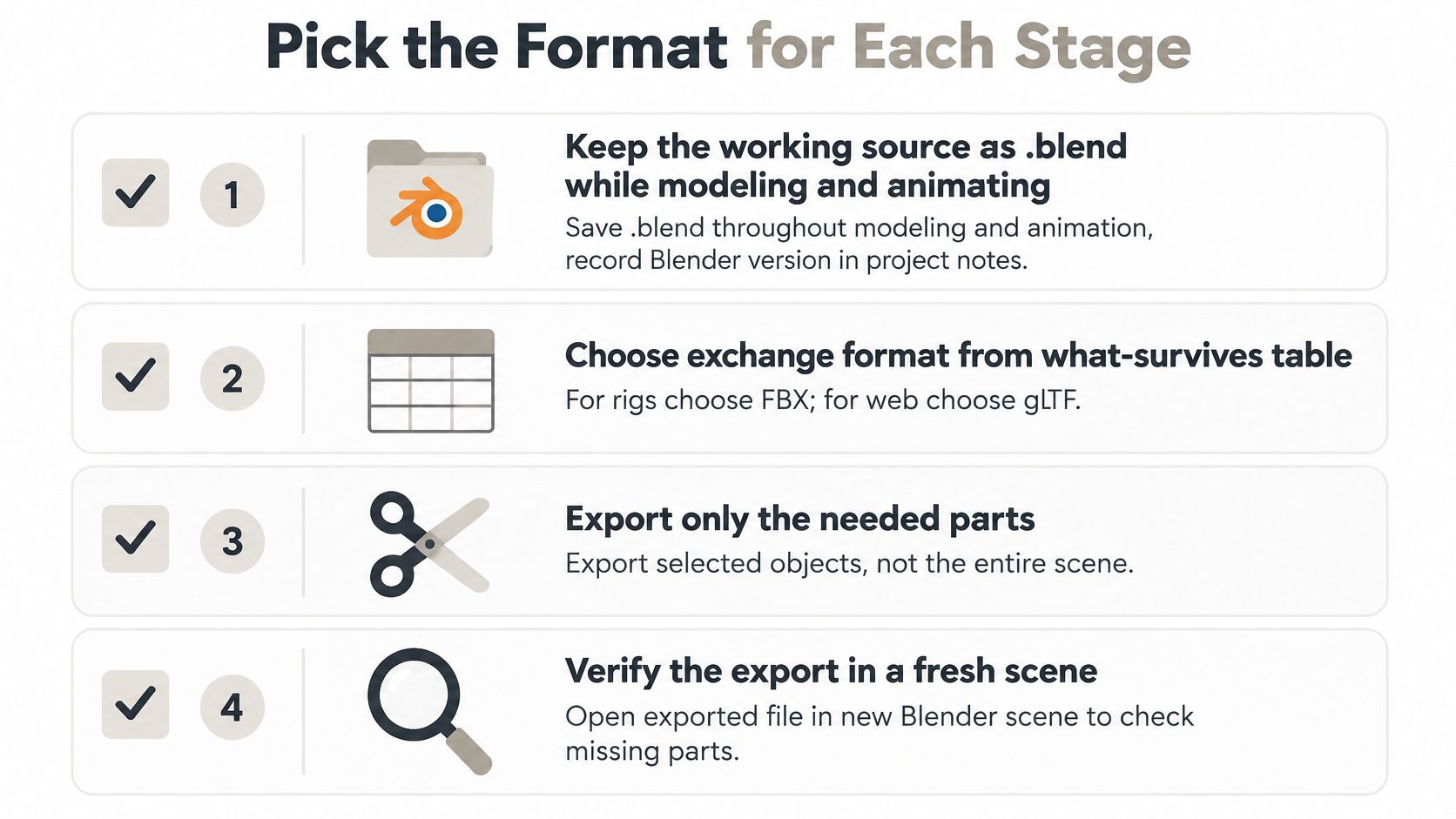
- Keep the working source as .blend through modeling and animation. Write the Blender version in the project notes, next to the asset name, so a later open is a planned act.
- Match the exchange file to the survivor list. FBX for rigs. glTF or GLB for web and AR. STL for single-material printing. 3MF when the print needs color and units. USD for scene hierarchy. Alembic for baked deformation. A pure archive can stop at the native copy.
- Export, then re-import into an empty scene. Check materials, scale, units, and custom properties against a screenshot of the source. Fix the export settings before you send the file.
- Pack external data and archive a version-pinned .blend. The packed copy is what you hand to another artist. The pinned original is what you restore when a conversion goes wrong.
- Render finals to PNG or OpenEXR, and encode the review movie with FFmpeg. Do not send a viewport grab as the approved frame.
If you are pulling generated meshes into this pipeline, export from Sculpty as GLB, OBJ, FBX, STL, USDZ, or 3MF, then run that same re-import check in Blender before the asset goes to a client, an engine, or a printer.
A short walkthrough of the save and export menus makes the menu paths concrete if your build's layout still feels unfamiliar.
The file you keep and the file you send are different jobs. Name both before the export, and the next person opens a scene they can use.
Sculpty is a browser 3D studio that generates meshes and exports them as GLB, STL, OBJ, FBX, USDZ, and 3MF, the same handoff formats this guide sorts by what they keep and drop. Generate or retopologize an asset, download the exchange file your next tool needs, and verify it in Blender before it leaves your desk. Start a model in Sculpty and run that export check on the first file you send.