
How to Create an Oxygen 3D Model in Sculpty
You've generated what looks like an oxygen molecule, but the two spheres sit at a slight angle, the bond length changes when you export, and the polished material makes the result look more authoritative than it is. That's a common failure with text-to-3D tools. They're good at producing convincing shapes, but they don't automatically understand the difference between an oxygen atom, molecular oxygen, and an orbital visualization.
A defensible oxygen 3D model starts with the chemistry, not the surface finish. For O₂, that means two identical oxygen atoms arranged linearly at 180°, with an O–O distance near 1.21 Å, then a deliberate decision about how to represent its electronic state. The workflow below shows how to create that asset in Sculpty, validate it before export, and avoid the shortcuts that turn an educational model into a misleading prop.
Table of Contents
- What Kind of Oxygen 3D Model You Need
- Writing Prompts That Generate Correct Oxygen Geometry
- Validating Bond Length and Linear Geometry
- Choosing the Right Export Format
- Cleaning Topology and Rendering the Final Asset
- Common Mistakes That Make Oxygen 3D Models Misleading
- Quick Checklist and FAQ for Your Finished Asset
What Kind of Oxygen 3D Model You Need
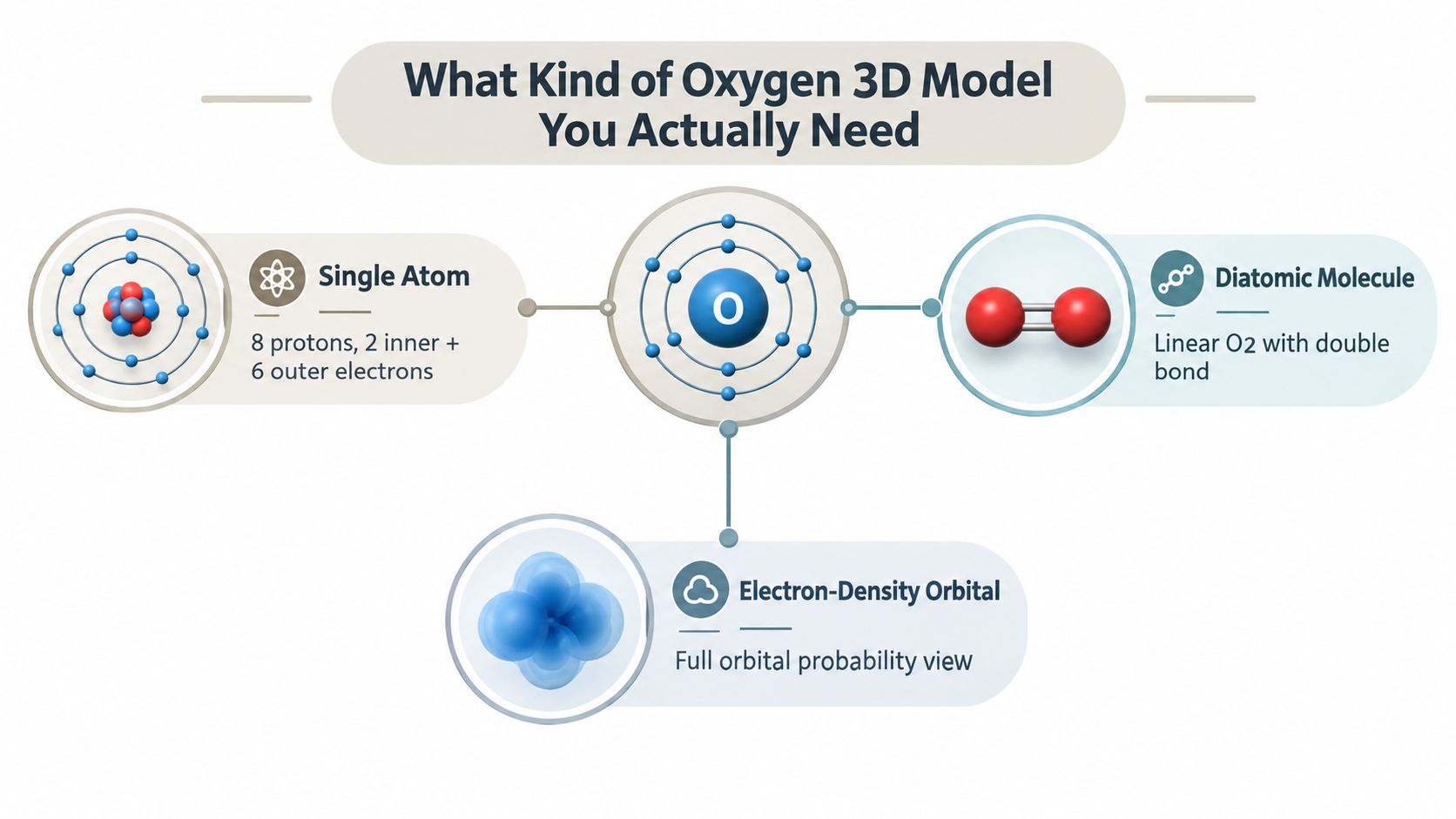
Before opening a generator, define the object you are building. “Oxygen 3D model” can describe a single atom, molecular oxygen, or an electronic-structure visualization. Each requires different geometry, labels, and rendering choices.
A single oxygen atom is an atomic teaching model. Oxygen is element 8, so a neutral atom contains 8 protons and 8 electrons. A simplified shell display places 2 electrons in the first shell and 6 in the second, following the ground-state configuration 1s²2s²2p⁴. That arrangement suits a classroom graphic or interactive lesson, but the rings are a teaching convention, not literal planetary orbits. The underlying atomic values appear in the NIST oxygen reference table.
Match the representation to the use
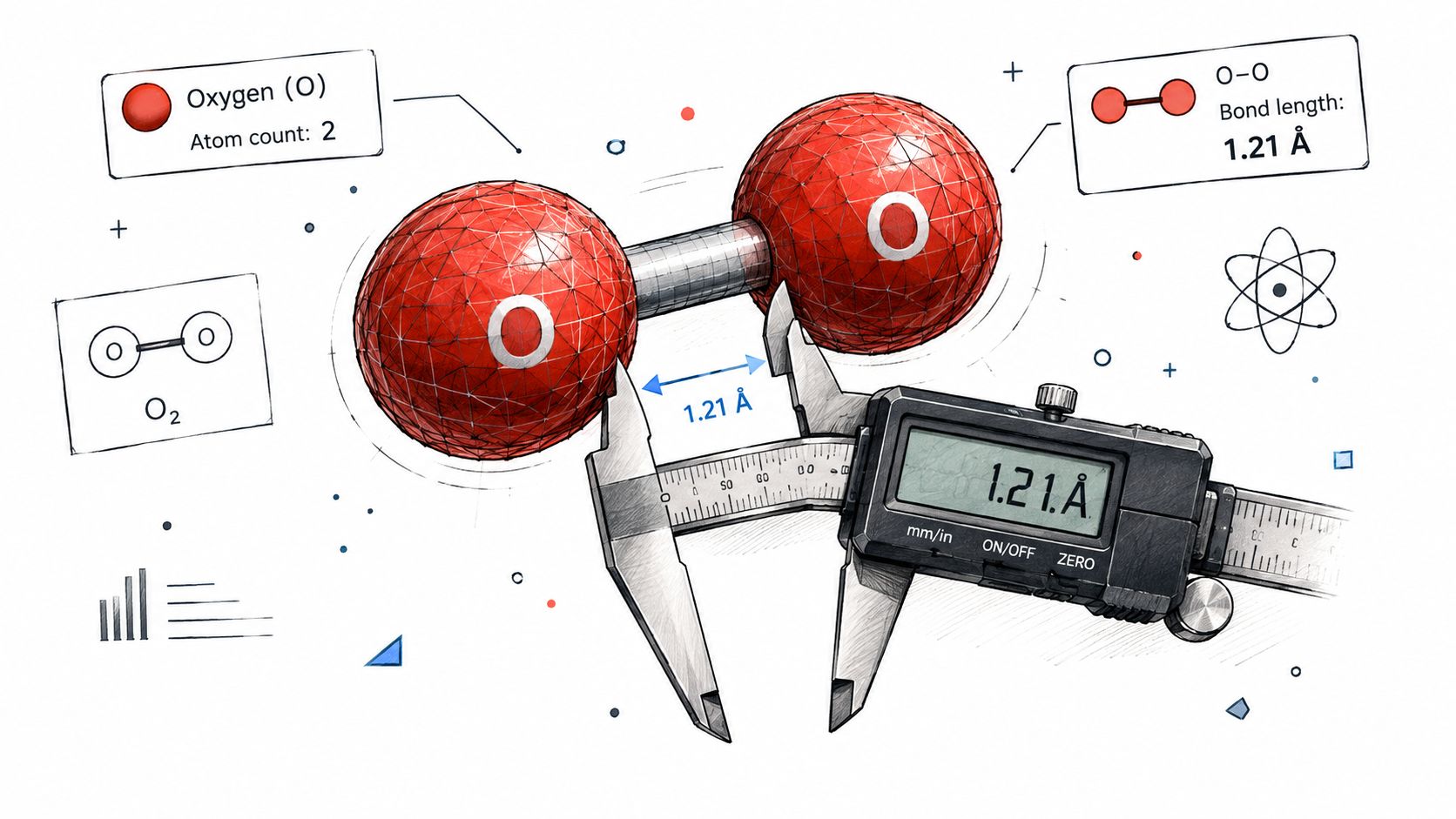
For an O₂ molecule, build two equal oxygen spheres on one axis. Keep the geometry linear at 180°, with an O–O distance close to 1.21 Å, as recorded in the NIST computed structure record. Treat those values as constraints in Sculpty rather than decorative suggestions. A text-to-3D generator may produce attractive spheres while bending the bond or changing the spacing, so inspect the geometry before export. This model suits a molecular viewer, chemistry lesson, or scientific render.
An electron-density or orbital view needs volumetric clouds, orbital lobes, or spin annotations instead of only balls and cylinders. O₂ has a paramagnetic ground state with two unpaired electrons in antibonding orbitals, a property that a decorative bond model cannot show by itself.
Practical rule: Decide whether the asset teaches atomic structure, molecular geometry, or electronic behavior before selecting its visual style.
A classroom poster may need the atom mode and clear labels. An AR demo can use the linear O₂ mode with an optional orbital layer. A 3D-printed pendant may use exaggerated spacing and thicker connectors, provided the file is labeled as a physical interpretation rather than a scale-accurate molecule.
Once validated renders and turntable exports are approved, social media API integration docs can push them into a publishing queue without altering the scientific source asset.
Writing Prompts That Generate Correct Oxygen Geometry
Text-to-3D models respond better to constraints than to broad descriptions. “A beautiful oxygen molecule” invites stylization. “Two identical oxygen atoms, linear O₂, 180° bond angle, center-to-center distance approximately 1.21 Å, no third atom” gives the generator fewer opportunities to improvise.

Use separate prompts for separate scientific views
For a single atom, try:
Educational 3D model of one neutral oxygen atom. Show a compact nucleus with 8 protons, simplified electron shells with 2 inner electrons and 6 outer electrons, clean labels, no molecular bond, no planetary orbit implication, presentation-ready geometry.
For molecular oxygen, be more forceful:
Scientifically constrained O₂ molecule. Exactly two identical oxygen atoms, aligned on one straight axis at 180°, center-to-center bond distance approximately 1.21 Å, symmetrical spheres, clear O–O connectivity, no third atom, no bent geometry, no ozone, neutral scientific visualization.
The phrase “exactly two” matters. Generic generators sometimes return O₃ because oxygen imagery is strongly associated with atmospheric chemistry. “No third atom” and “no ozone” reinforce the object count.
For an orbital-oriented result, don't ask for a normal ball-and-stick model:
Scientific electron-density visualization of molecular oxygen, O₂. Two oxygen nuclei aligned linearly, with a volumetric probability-cloud treatment and an annotation for two unpaired electrons in antibonding π* orbitals. Do not depict electrons as planetary paths. Keep the molecular axis straight and preserve the two-atom identity.
The five available text-to-3D engines, Meshy, Hunyuan 3D, Rodin, Tripo AI, and TRELLIS 2, may interpret the same language differently. If the first output bends the molecule or adds decorative parts, switch engines before editing the mesh. It's usually faster to regenerate with stronger constraints than to repair a wrong primitive layout manually.
Add a fallback when text generation keeps stylizing
If text prompts repeatedly produce a bent pair, create a clean reference image first. Use an orthographic front view with two identical circles, a single horizontal axis, an explicit O–O label, and no perspective distortion. Feed that image into an image-to-3D workflow, then treat the result as a mesh draft rather than a validated scientific file.
Keep the generation prompt separate from the validation criteria. Prompt wording can request a target, but only measurement confirms whether the asset achieved it. For more general prompt construction principles, the Sculpty prompt engineering guide is a useful companion.
The following video provides a visual reference for working inside a browser-based 3D workflow:
Validating Bond Length and Linear Geometry
A generated mesh isn't finished when it looks right in the viewer. Treat the first output as a hypothesis and run a short quality gate before texturing or rendering.
Check the structure in a fixed order
- Confirm the atom count. O₂ must contain two oxygen atoms. A third sphere means you've generated ozone or an accidental decorative element.
- Measure center to center. Use the nuclei or sphere centers, not the outside edges. The benchmark is approximately 1.21 Å, or 0.1208 nm, for the experimentally established O–O distance in the cited NIST record.
- Verify collinearity. The two atom centers must share one axis. With only two atoms, the molecular angle is 180°.
- Inspect the electronic annotation. If the asset claims to show electronic behavior, identify the two unpaired electrons or the antibonding π* orbitals. Geometry alone can't show paramagnetism.
Watch for scale traps
A common silent error happens when the artist scales atom spheres and bond cylinders independently. The model still looks balanced, but the measured center-to-center distance no longer corresponds to the reference geometry. Preserve the validated coordinate relationship in the native file, then apply a uniform scale only when preparing a render, AR asset, or physical print.
Use the web viewer for a fast visual inspection, then open GLB, OBJ, or STL files in a dedicated viewer if you need a second opinion. The point isn't to admire the mesh. It's to expose topology gaps, duplicated atoms, disconnected bonds, and hidden transforms. The practical distinctions between perspective, orthographic, wireframe, and other inspection modes are covered in different views of 3D objects.
A clean render can hide a wrong molecule. A measurement cannot.
Choosing the Right Export Format
Export format should follow the destination, not personal preference. An oxygen 3D model for a browser viewer has different requirements from one sent to a slicer or imported into a game engine.
| Format | Best For | Notes |
|---|---|---|
| GLB | Web viewers and interactive presentation | Keeps geometry and scene data together in a compact package. |
| USDZ | AR workflows on compatible platforms | Useful when the destination expects an AR-oriented package. |
| OBJ | Blender and broad interchange | Straightforward geometry exchange, but material handling may require companion files. |
| FBX | Game engines and production pipelines | Suitable for scene-oriented workflows where transforms and animation matter. |
| STL | Basic 3D printing | Focuses on printable surface geometry, not rich materials or scene metadata. |
| 3MF | 3D printing workflows | Useful when the print pipeline supports richer manufacturing information. |
For a browser lesson or AR demonstration, choose GLB or USDZ after checking that the atomic labels and materials survive conversion. For Blender or Unity, OBJ is a practical geometry handoff, while FBX is better suited to a scene that includes animation or production transforms. For a physical object, STL and 3MF are the relevant choices, but neither should replace the higher-precision coordinate source used to verify the chemistry.
A converter is useful when the geometry is already correct and only the destination package needs to change. Re-exporting through a different tool can introduce unwanted scale changes, missing normals, or material substitutions. Keep the validated source untouched, and create a clearly named visualization copy for presentation-specific edits.
The 3D file formats guide offers broader context on how these formats behave across common workflows. The key decision remains simple: use a scene-friendly format for visualization, a manufacturing format for printing, and preserve the reference coordinates separately.
Cleaning Topology and Rendering the Final Asset
Post-processing should improve the asset without changing its chemical structure. The safest order is remesh first, texture second, render third.
Start with a remesh when the generated spheres or bond geometry contain irregular fragments, self-intersections, or uneven density. Retopology can then produce cleaner quads for editing or game-ready triangles for real-time use. Don't let automatic cleanup merge the two atom centers or alter the axis relationship. After each major operation, reopen the model and confirm that the two-atom layout still measures correctly.
Keep materials subordinate to the science
Use restrained PBR materials for an educational oxygen 3D model. A matte or lightly satin finish usually reveals the silhouette and bond connection better than a mirror-like surface. Strong metallic reflections can make a simple sphere look polished while hiding a malformed junction.
Prompt-driven texturing works well for controlled variations, such as a clean colored oxygen material, a neutral scientific palette, or a labeled classroom version. It works less well when you ask for “dramatic chemistry” and allow the system to add flames, smoke, glowing energy, or extra particles. Those effects belong in a marketing render, not in the validated base asset.

Render Studio is useful for controlled presentation scenes. Set a neutral camera, soft lighting, and a background that separates the atom spheres from the bond. A 4K render can support a lesson, portfolio review, or client approval, while a transparent-background 360° turntable is better for compositing and product-style presentation. If the asset needs motion graphics around the molecule, resources on motion graphics tools for startups can help with the surrounding presentation without changing the underlying model.
Store the final approved version in the private gallery with a name that records its representation, such as oxygen_atom_shell_view or oxygen_O2_linear_validated. Keep the scientific master and the presentation version separate.
Common Mistakes That Make Oxygen 3D Models Misleading
A polished oxygen asset can still teach the wrong chemistry. One common failure is drawing electrons as tiny planets on circular tracks. That shell image suggests definite orbits and motion, while a simplified teaching diagram represents electron distribution in a limited visual way.
A bond rod also has limits. It communicates connectivity and approximate geometry, not the full electronic structure. If the asset makes a claim about O₂'s ground state, include a concise label or optional orbital layer, and retain the paramagnetic explanation established in the validation section.
Separate atom, molecule, and orbital modes
Keep each representation available as a separate view or mode rather than merging every convention into one mesh.
- Atom mode: nucleus, simplified electron-shell teaching view, and atomic label.
- O₂ mode: two oxygen atoms, linear geometry, and the validated bond distance.
- Orbital mode: probability cloud or orbital visualization, with a note explaining what the cloud represents.
Labels create another failure point. A text-to-3D tool may place “O2” beside a single atom, label ozone as oxygen, or attach an orbital caption to a ball-and-stick view. Check the atom count, formula, charge notation, and legend against the geometry before delivery. As established in the validation section, a three-sphere output is ozone, not a stylistic variation of O₂.
Isotope variants can add useful teaching depth. All three stable oxygen isotopes retain 8 protons. Oxygen-16, oxygen-17, and oxygen-18 contain 8, 9, and 10 neutrons, respectively, with terrestrial abundances of approximately 99.76%, 0.048%, and 0.20%, according to the NIST isotope data. Use these variants to show that proton count defines chemical identity, while neutron count changes nuclear mass.
Quick Checklist and FAQ for Your Finished Asset
Use this compact handoff checklist before publishing or printing:
- Choose the representation: atom, linear O₂ molecule, or orbital view.
- Constrain the prompt: specify two atoms, one axis, 180°, and the target bond distance.
- Validate the mesh: check atom count, center distance, collinearity, and electronic annotations.
- Clean carefully: remesh and retopologize without changing the validated coordinates.
- Export deliberately: use GLB or USDZ for presentation, OBJ or FBX for production, and STL or 3MF for printing.
- Render last: keep the scientific master separate from the textured presentation copy.
Can I 3D print the model cleanly?
Yes, but treat the printed object as a scaled educational model, not a literal atom-sized structure. Apply one uniform scale, inspect watertightness, give thin bonds enough physical thickness for your printer and material, and confirm that the slicer doesn't interpret overlapping spheres as separate shells.
How can I animate stretching or rotation?
Create animation controls around the validated rest pose. A rotation can preserve the O₂ bond distance, while a stretch animation should be labeled as a visualization of vibration rather than a permanent change to the reference geometry. Keep the rest-state file unchanged.
How can I share the asset?
Use the private gallery for review and a free web viewer for recipients who don't need a local 3D application. Share the presentation file, but retain the coordinate-validated master so later exports don't overwrite the scientific reference.
Build the atom, molecule, and orbital views as separate assets, then validate the O₂ geometry before you spend time on materials or animation. Sculpty brings text-to-3D generation, remeshing, texturing, rendering, and export into one browser workflow, making it practical to take a constrained oxygen model from prompt to review-ready asset.