
Free 3D Cat Model Sources: 10 Reputable Places Compared
Your small team needs a cat for a mobile game prototype by Friday. You download a free model, drop it into Blender, and start adjusting the materials. Then someone checks the license. It's CC BY-NC, so the team can't use it in the commercial release without separate permission. Now you're replacing an asset that already has work attached to it.
Finding a free 3D cat model isn't the hard part. Finding one that fits the job without creating another job is harder. A printable figurine won't necessarily deform well. A convincing browser preview doesn't prove the texture files are included. A rigged Blender character may lose its controls when exported to your engine.
Check these before you commit:
- License terms: Confirm commercial use, attribution, modification, and any restrictions on selling prints or redistributing files.
- Format and geometry: Match the download to Blender, your game engine, or your slicer. Inspect topology rather than trusting the thumbnail.
- Production status: Establish whether you're getting an animation rig, a static prop, a printable object, or starting geometry.
The options below include individual assets and collections. They aren't interchangeable recommendations. Choose by the work you need to finish, then inspect the actual download before building around it.
Table of Contents
- 1. Toon Cat FREE, Sketchfab
- 2. Domestic Cat, Rigged, Blendkit
- 3. Free Cats Collection, TurboSquid
- 4. Free 3D Cats, Free3D
- 5. Base Mesh Cat, CGTrader
- 6. Cute Low Poly Cat (No Supports), Printables
- 7. Articulated Cat, Printables
- 8. Cats Collection, MakerWorld
- 9. Cute Cat, TurboSquid
- 10. Domestic Cat Curled Asleep, Innerscene
- How the 10 free cat model sources differ by license, format, and intended use
- Match the License and Format First, Then Import
1. Toon Cat FREE, Sketchfab
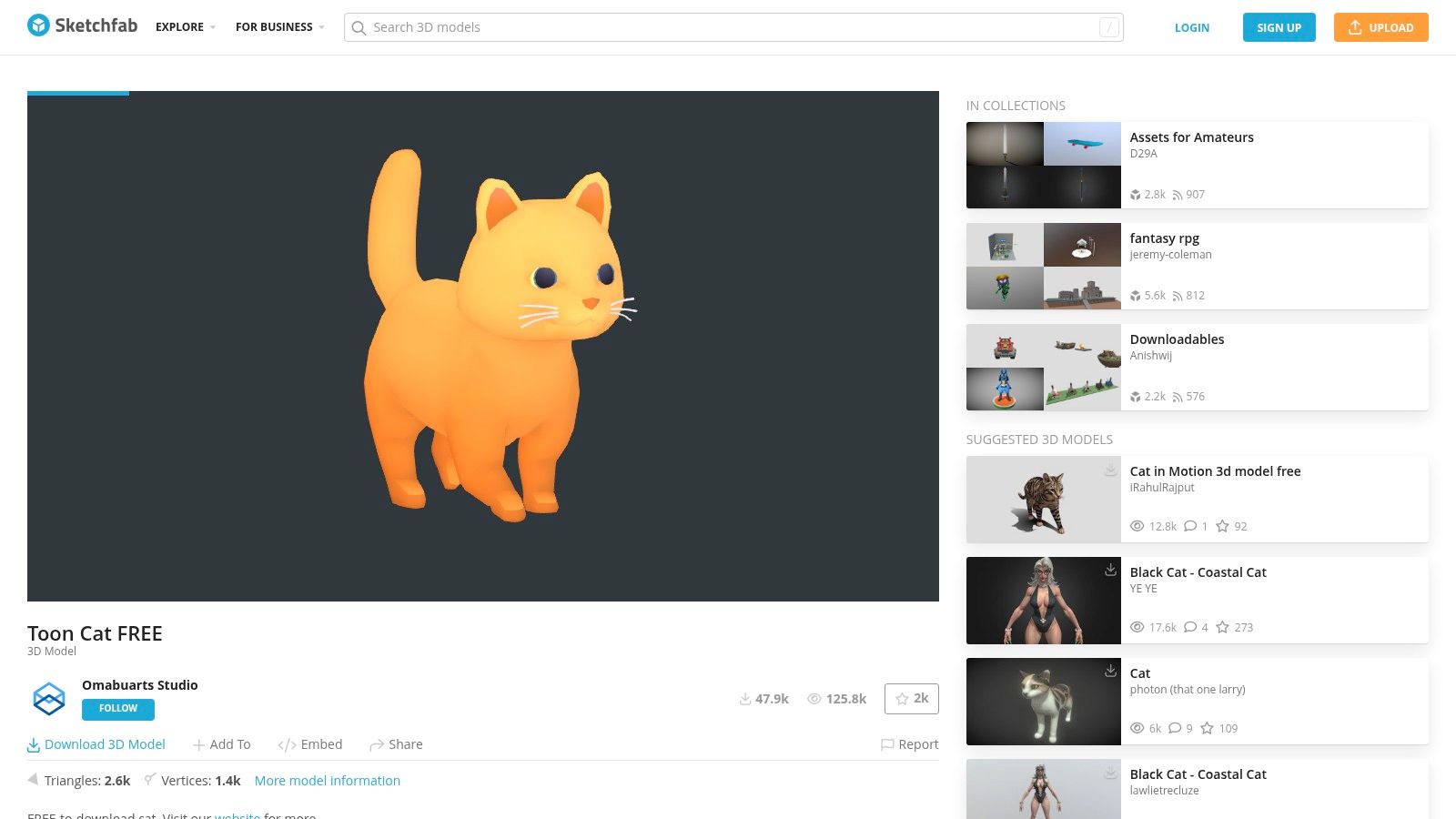
For a stylized game prop, start with Toon Cat FREE on Sketchfab. Its painted appearance suits scenes where a readable silhouette matters more than realistic fur. The interactive preview lets you inspect the underside, tail, and face before downloading.
The useful distinction is lightweight appearance versus production readiness. Simple geometry can still arrive with awkward material assignments, missing texture paths, or topology that won't bend cleanly. Treat this as a candidate for a static prop or prototype character until you've inspected the files.
Check the painted material before rebuilding it
Open the asset in your target application and compare it with the browser preview. If the paint already contains shadows and highlights, strong scene lighting may make it look muddy. Test a restrained material before adding more shading complexity.
- License catch: The listing specifies CC Attribution. Record the creator, asset title, license, and asset URL for your credits.
- Format catch: Confirm which downloadable package contains the textures. Don't assume the preview's appearance will survive every import.
- Rig catch: Don't schedule animation work until you've established whether a usable skeleton is included.
Use it when: You need a stylized cat for a lightweight scene or prototype.
Avoid it when: You need a verified animation rig or can't accommodate attribution.
2. Domestic Cat, Rigged, Blendkit
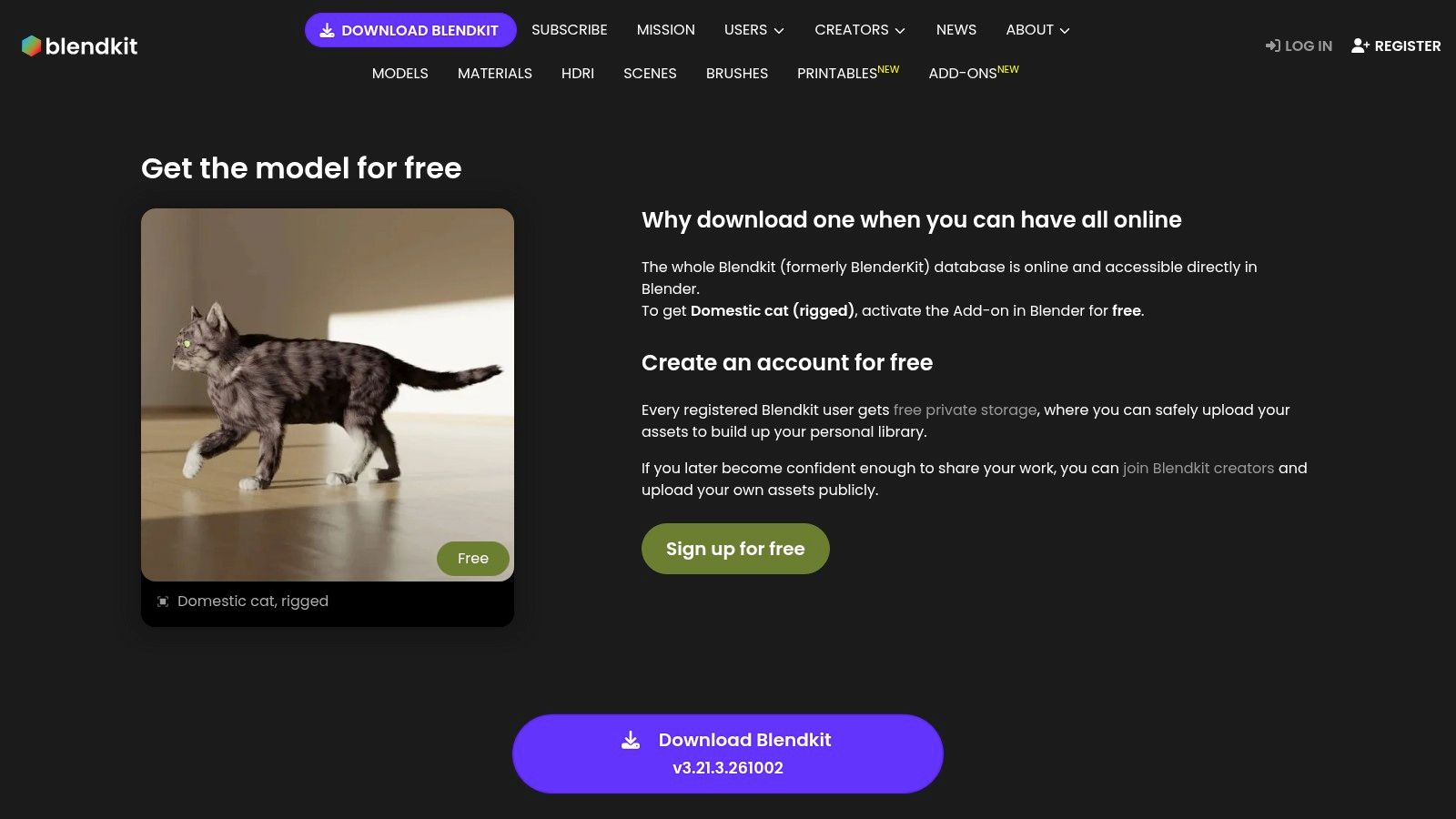
A cat that needs to sit, turn, or walk calls for a different starting point. Domestic Cat, Rigged on Blendkit is aimed at a Blender-centered workflow, with discovery and import through the add-on. That's convenient if Blender is where you'll pose and render the character.
Rigged doesn't automatically mean ready for your animation. Check the controls, weight painting, and range of motion before committing to a shot. Bend the shoulders and hips, curl the tail, and inspect the belly for collapsing geometry.
Practical rule: Test the most demanding pose first. A neutral standing pose tells you very little about deformation quality.
Account and add-on setup are part of the workflow. Verify the asset's license separately, and check whether the download includes everything the rig needs rather than relying on the asset title.
For engine delivery, distinguish Blender controls from the deforming skeleton. Constraints and custom controls may require baking before export. The guide to animating a character in Blender provides a useful workflow reference once you've checked the rig.
Use it when: You want to pose or animate a cat inside Blender.
Avoid it when: You need a proven engine-ready rig without testing or export cleanup.
3. Free Cats Collection, TurboSquid
Searching a collection makes sense when the art direction isn't settled. The free cats collection on TurboSquid lets you compare stylized, realistic, rigged, and print-oriented candidates. It's a search starting point, not a standardized asset pack.
Start with the required format, then narrow by rigging or animation. Browsing only by appearance is inefficient: an attractive cat in an unsuitable native format can create more conversion work than it saves.
Filter for the delivery, not the thumbnail
For a game prototype, prioritize a package you can import and inspect immediately. For Blender animation, favor access to the native rig. For a figurine, look for print-specific files and evidence that the design was prepared for fabrication.
- Search catch: Results can include cat-related props rather than a complete cat.
- File catch: A format listed on the page doesn't establish that every material, texture, or animation is included in that version.
- License catch: Check the individual asset's terms. A free search filter isn't a permission statement.
Compare the cost of cleanup, not just download convenience. A documented static mesh can be a better choice than an undocumented rig if your cat only appears asleep beneath a table. Conversely, a detailed sculpt is a poor shortcut when the schedule requires locomotion.
Use it when: You need to compare styles and technical options.
Avoid it when: You expect consistent licensing, topology, or file packaging across the results.
4. Free 3D Cats, Free3D
Free3D's cat category is useful when you're choosing between digital and print workflows. Browse for the intended use and confirm that the individual asset is actually free. Paid and free entries can appear within the broader category.
License differences matter even for simple geometry. A representative low-poly printable cat listing on Free3D specifies personal use, so its downloadable status shouldn't be treated as permission for a commercial game or print shop.
That distinction is easy to miss when the model looks like exactly what you need. Save the license information with the source files before investing in cleanup.
Pick the file that preserves the work you need
OBJ can be useful for static geometry, but it won't carry an animation rig. STL suits a print-oriented handoff, but it isn't a substitute for a textured character package. A native Blender file or an FBX may be more appropriate for digital work, depending on what the creator includes.
Inspect normals, separate parts, and scale after import. For printing, also check whether the tail, paws, and body form a suitable solid. A printable label is a starting point for inspection, not a reason to skip the slicer preview.
Use it when: You want to compare downloadable cats across digital and fabrication uses.
Avoid it when: You need uniform documentation or assume free means commercially unrestricted.
5. Base Mesh Cat, CGTrader
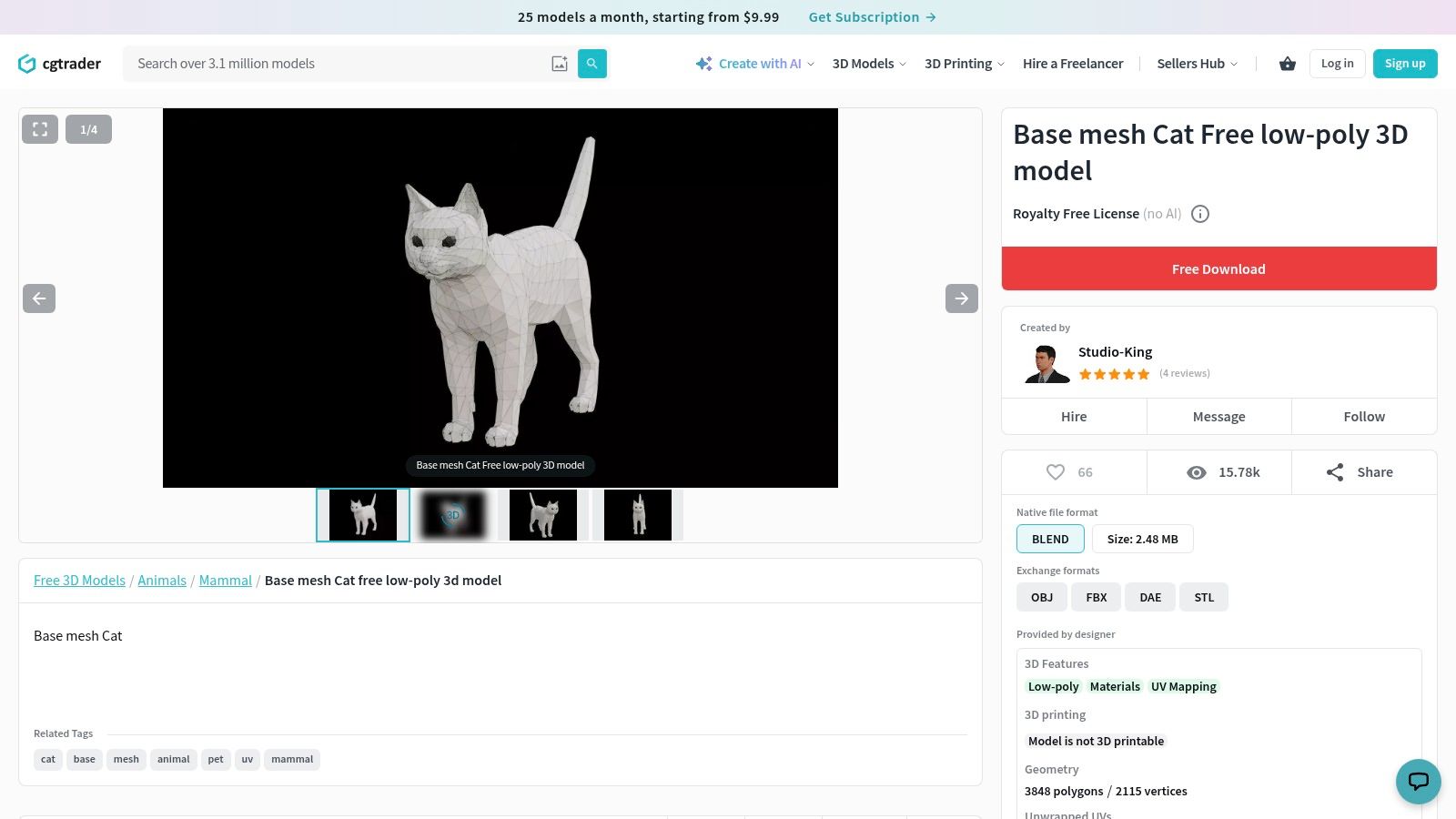
Choose the Base Mesh Cat on CGTrader when you want to design the cat rather than inherit a finished look. Starting geometry can save the repetitive work of blocking out a body, legs, head, and tail. It doesn't remove the need to judge anatomy.
Before subdividing, inspect the silhouette from the side, front, and top. Fix shoulder placement, leg length, and the head-to-body relationship while the mesh is still easy to edit.
A base mesh is useful because you can change it cheaply. Don't add detail before the proportions fit the character.
For sculpting, prioritize evenly distributed geometry and sufficient volume around areas you'll reshape. For animation, inspect edge flow around the hips, shoulders, jaw, and tail base. Those are different acceptance tests, and a mesh that suits sculpting may still require retopology afterward.
Check the included formats, UV status, and license on the listing. Don't assume base mesh means textured, rigged, or ready for subdivision without artifacts. Keep an untouched source copy so you can recover if a sculpting pass becomes too destructive.
Use it when: You need a customizable foundation for sculpting or character development.
Avoid it when: You need a finished cat with materials and animation controls immediately.
6. Cute Low Poly Cat (No Supports), Printables
A decorative print doesn't need an animation skeleton. It needs geometry that slices predictably and survives handling. Cute Low Poly Cat on Printables supplies an STL and is described as printable without supports.
Its stated CC BY-NC license makes this a noncommercial choice unless you obtain separate permission. Don't build a print-for-sale offering around it just because downloading the file costs nothing.
Support-free still needs a slicer check
The no-support description is useful, but orientation and scale still matter. Inspect the first-layer footprint, the underside of the chin, and the tail in the sliced preview. Shrinking the model can make small features harder to print or easier to break.
- Geometry advantage: Flat facets can give a decorative cat a deliberate style without relying on surface textures.
- Workflow limitation: STL doesn't provide a ready-made UV layout, painted material, or digital rig.
- Community evidence: Review user makes for visible failures and compare their orientation with yours.
For changes to the silhouette, the guide to making low-poly models can help you preserve a coherent faceted look. After editing, recheck the mesh for holes and overlapping internal faces before slicing again.
Use it when: You want a personal decorative print with a low-poly appearance.
Avoid it when: You plan to sell prints or need an animation-ready digital cat.
7. Articulated Cat, Printables
Articulated means physical movement here, not a digital character rig. The Articulated Cat on Printables is a print-in-place design intended to move after fabrication. Its joints make printer setup more consequential than it would be for a solid figurine.
Inspect the creator's instructions and community makes before changing the size. Joint clearances don't necessarily remain practical when you scale the whole model down. First-layer expansion can also fuse parts that should move independently.
Print warning: Don't add supports through moving joints without checking how you'll remove them. Trapped support material can defeat the mechanism.
Use the sliced preview to inspect separation between linked parts. Confirm that your printer is producing clean bridges and isn't over-extruding before committing to the full model. A machine that prints a static ornament well may still struggle with close-fitting joints.
The guide to modeling for 3D printing is relevant if you intend to modify the design. Treat tolerances as functional geometry, not empty space you can casually close.
Check the creator's license before remixing, sharing files, or selling finished prints. Community availability doesn't establish those permissions.
Use it when: You want a movable physical cat and can tune your printer.
Avoid it when: You need a skeletal animation asset or a print that tolerates untested scaling.
8. Cats Collection, MakerWorld
Sometimes the deliverable isn't a character at all. The Cats Collection on MakerWorld groups printable designs such as a flexi cat, coaster, bookmark, and sphynx cat. That makes it useful for browsing decorative objects and functional cat-themed accessories together.
The important limitation is that a collection isn't a single downloadable model. Open the individual entry to establish what you're getting, how it prints, and which terms apply.
Separate the design from its print profile
An available print profile can reduce setup work, but it reflects particular assumptions about the machine, material, and orientation. Check those assumptions against your own printer rather than sending the job unchanged.
- For a figurine: Inspect thin ears, tail attachment, and the contact area with the build plate.
- For a bookmark: Check thickness and whether decorative details will survive normal handling.
- For a flexi design: Inspect moving clearances and follow the creator's printing instructions.
Choose the object around its purpose. A cat-shaped coaster can be a better gift project than a detailed sculpture, but it won't satisfy a request for a complete digital animal. Likewise, a print profile doesn't establish animation suitability.
Read the license on each model page, especially before redistribution or selling prints. Don't assume neighboring entries in the same collection share terms.
Use it when: You want varied cat-themed printing projects in one browsing collection.
Avoid it when: You need a single consistent asset package or a game character.
9. Cute Cat, TurboSquid
For material experiments, a specific asset can be more useful than another search page. Cute Cat on TurboSquid is listed as free and described by its creator as suitable for painting. Consider it a candidate for color and surface customization, not a promise of a finished material setup.
First establish what painting means for your intended workflow. Digital texture painting needs usable UVs or another deliberate mapping approach. Painting a physical print needs a printable solid and a suitable fabrication workflow.
Those requirements aren't interchangeable. A model can be pleasant to color in a rendering application while still needing substantial repair for printing.
Inspect before choosing a painting workflow
Check the included file extensions and open a copy in your target application. Look for separate material regions, overlapping UVs, and textures that might be missing from the package.
If you're painting digitally, test a visible marking across the body and legs to reveal stretching. If you're printing, inspect the mesh in your slicer before planning primer and paint. Don't infer format availability from the page title alone.
The asset remains subject to its listing's license terms. Confirm those before using a customized version in client work or distributing the edited file.
Use it when: You want a specific cat to customize with colors or materials.
Avoid it when: You need verified UVs, print readiness, or a complete rig before inspection.
10. Domestic Cat Curled Asleep, Innerscene
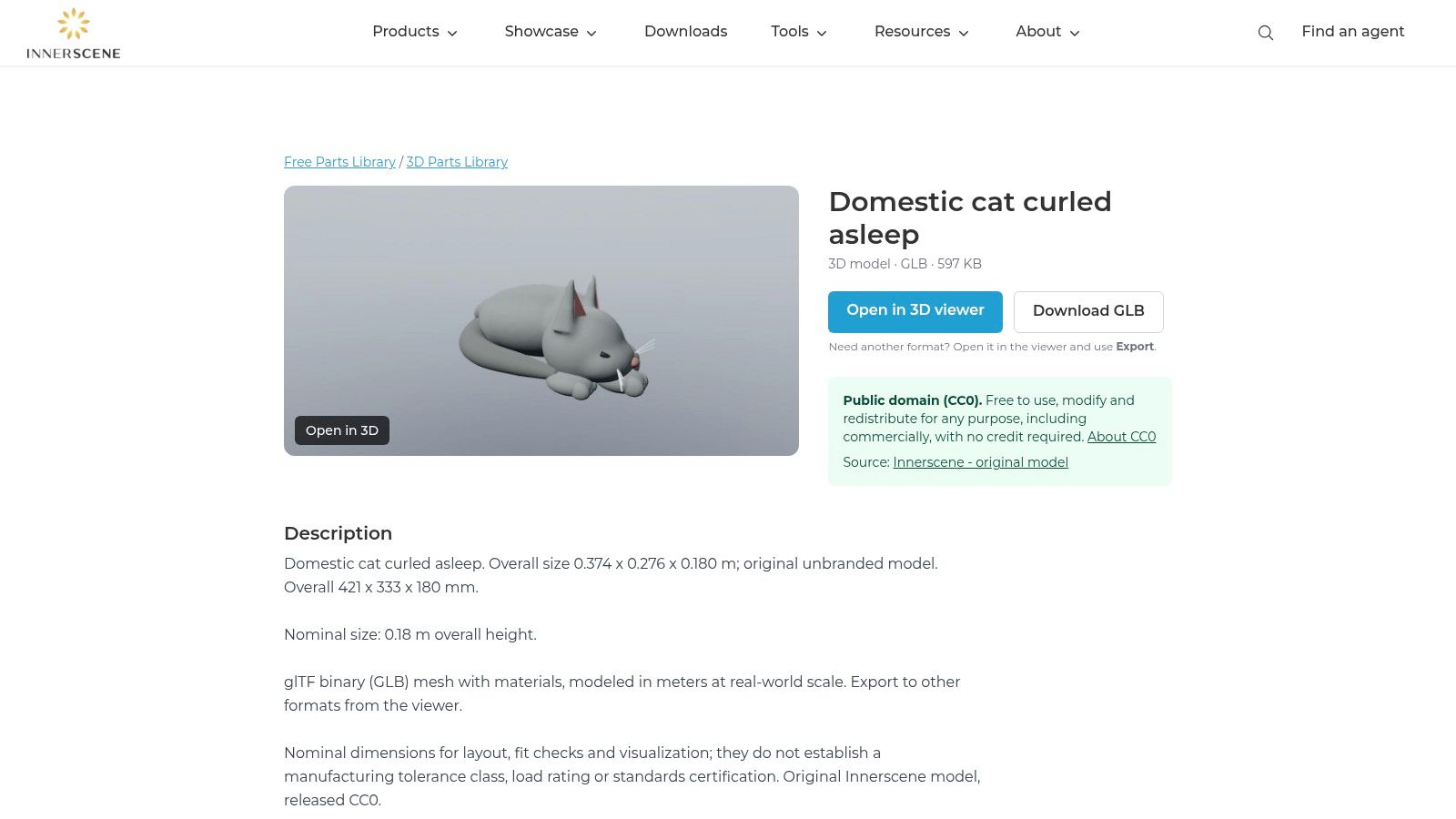
A sleeping cat can finish an interior scene without adding animation work. Domestic Cat Curled Asleep on Innerscene offers a GLB download, browser preview, and a stated CC0 license. It's a direct candidate for a static scene prop.
GLB is convenient for a packaged digital handoff, but inspect the imported result. Material interpretation can differ between viewers and rendering applications, and a stated real-world scale still deserves a dimensions check.
The curled pose is the main trade-off. It works beside a sofa, on a cushion, or in a background vignette. It's a poor foundation for a walking cat because separating compressed limbs and rebuilding their hidden surfaces can become extensive modeling work.
- License fit: The stated CC0 terms offer broad reuse flexibility. Keep a record of the listing with your asset files.
- Format fit: GLB suits digital viewing and scene assembly. Printing requires further preparation.
- Pose fit: Treat this as a sleeping prop unless you're prepared to remodel and rig it.
Check the underside against the surface where you'll place it. Small contact gaps can make an otherwise convincing prop appear to float.
Use it when: You need a static sleeping cat for visualization or a digital mockup.
Avoid it when: You need locomotion, a neutral sculpting pose, or a ready-to-slice figurine.
How the 10 free cat model sources differ by license, format, and intended use
| Item | Best For | License | Formats | Rigged or Printable |
|---|---|---|---|---|
| Toon Cat FREE, Sketchfab | Lightweight stylized digital scenes | CC Attribution | Downloadable format to check | Not stated as rigged or printable |
| Domestic Cat, Rigged, Blendkit | Posing or animation in Blender | Check asset listing | Accessed through Blender add-on; format to check | Rigged |
| Free Cats Collection, TurboSquid | Finding varied cat models for digital use or printing | Varies by listing | Blender, FBX, OBJ, STL, glTF | Includes rigged and printable options |
| Free 3D Cats, Free3D | Browsing cat models by format and use | Check each listing | OBJ, STL, Blender, FBX | Includes rigged and printable options |
| Base Mesh Cat, CGTrader | Custom modeling or sculpting | Verify listing terms | Check listing | Rigging or printability not stated |
| Cute Low Poly Cat (No Supports), Printables | Noncommercial decorative printing | CC BY-NC | STL | Printable without supports; not animation-ready |
| Articulated Cat, Printables | Printing a movable cat model | Check creator's license | Check model page | Articulated for printing; not digitally rigged |
| Cats Collection, MakerWorld | Browsing varied cat-themed prints | Check each model listing | Check individual listings | Collection includes printable designs |
| Cute Cat, TurboSquid | Painting or customizing a cat model | Check listing terms | Check listing | Rigging or printability not stated |
| Domestic Cat Curled Asleep, Innerscene | Digital scenes and visualization | CC0 | GLB | Not stated as rigged; not STL-first |
Match the License and Format First, Then Import
The Friday prototype team didn't lose time because free cats were hard to find. They lost time because they checked permission after starting production. Reverse that order, and you can reject unsuitable assets before anyone repairs materials or builds animations around them.
Start with the actual intended use. A commercial game, a personal print, and a print-for-sale product are different licensing decisions. Read the individual asset's terms, preserve the license record, and prepare attribution where required. If permission is unclear, ask the creator or choose another model.
Test the asset in its destination
A successful Blender import isn't the final acceptance test for a Unity character or a printable figurine. Open the model where it will be used. Missing materials, incorrect dimensions, and broken animation exports are easier to resolve before the asset becomes part of a larger scene.
- For games: Check triangle count, material slots, texture paths, pivot placement, scale, and deformation. Test performance in a representative scene rather than judging the mesh alone.
- For animation: Exercise the shoulders, hips, spine, and tail. Confirm that the export preserves the deforming skeleton and any required baked motion.
- For printing: Inspect watertightness, normals, wall thickness, contact area, and support access. Review the sliced toolpaths before starting the printer.
- For sculpting: Check proportions and geometry distribution before adding detail. Plan for retopology if the final asset must animate.
Don't convert formats merely to match a preferred extension. Conversion doesn't create missing production features. Exporting an STL as FBX won't add UVs or a rig. Saving a textured digital cat as STL won't make thin ears printable or repair intersecting surfaces.
If no free listing fits the license, pose, or silhouette, a text-to-3D or image-to-3D tool such as Sculpty can provide a starting cat mesh. Describe the pose and proportions clearly, or use an image you have permission to upload. Then inspect the result as critically as a downloaded asset.
Remesh or retopologize where needed, prepare textures for the target renderer, and repair geometry for the slicer. Verify the applicable generation and usage terms before commercial delivery. Generated geometry changes how you obtain the starting mesh, not the standards it must meet.
Choose the source that leaves the least unresolved work for your particular job. A modest static cat with suitable permissions is often a better production choice than a detailed model with an incompatible license or unusable rig.
Sculpty offers browser-based text-to-3D and image-to-3D generation, plus texturing, remeshing, retopology, and file export tools. Visit Sculpty to create a starting cat mesh, then prepare and test it for your game scene, visualization, or print workflow.