
How to Make a 3D Printed Bobblehead
The usual advice for making a 3D printed bobblehead starts with the face: upload a photo, enlarge the head, print the figure, and add a spring. That order makes it easy to produce a convincing miniature that won't nod. A heavy head can collapse onto the shoulders, a tight socket can trap the connector, and a drop of glue in the wrong place can turn the whole assembly into a statue.
Start with the mechanism, then build the portrait around it. Choose the spring, reserve its mounting space, and test it under a realistic load before spending filament on hair, clothing, and facial detail. The likeness matters, but a working bobblehead needs room to move.
Table of Contents
- Print Sizes That Let a Head Actually Nod
- Build the Mesh Around the Spring
- Print the Spring Before the Shell
- Seat the Spring Then Paint
- Fix a Head That Locks or Cracks
- Call It a Display Piece or a Toy
Print Sizes That Let a Head Actually Nod
Every working design needs a lightweight head, a body with an integrated neck boss, and a spring or flexible connector. The neck boss is the reinforced mounting feature that holds the connector. It isn't merely the visible neck.
Starting sizes for a working bobblehead
The dimensional starting points below follow the documented FDM workflow in Printpal's custom bobblehead guide, including approximately 15% infill, a 14.5 mm spring, receiving holes of about 15 mm, and roughly 0.25 mm radial clearance.
| Part | Starting size | Print note | What it must do |
|---|---|---|---|
| Head | Hollow shell, thicker only at the socket | About 15% infill in printed regions | Stay light enough for the spring to support |
| Body and neck boss | Sockets on one vertical axis | About 15% infill, extra walls at the neck | Carry repeated nod loads |
| Coil spring | Match the selected connector's actual dimensions | Inspect the sliced spring arms before printing | Flex under the head without collapsing |
| Receiving holes | About 15 mm for the documented 14.5 mm spring | About 0.25 mm radial clearance | Permit assembly without binding |
| Supports | Tree supports on ears and brims | No support inside the socket | Keep residue from obstructing seating |
These are calibration benchmarks, not guaranteed tolerances. In particular, the spring dimension describes one documented design, not a universal bobblehead standard.
Separate hollowing from infill
A hollow head and low infill aren't the same thing. Hollowing creates an intentional cavity in the model. Infill controls how the slicer fills regions that remain solid.
Inspect the sliced cross-section rather than trusting the percentage field. You want a light head with a reinforced mounting area, not a thin socket surrounded by unnecessary internal plastic.
Also distinguish radial clearance from the difference between hole and spring diameters. Radial clearance is the gap on each side when the parts are centered. Confusing those measurements can leave you with a socket that looks generous on screen but grips the spring after printing.
Test a socket before printing a face
Print a small block containing the proposed socket and a matching connector sample. Try progressively looser fits, marking each coupon so you can identify the successful version.
- Seat without forcing: The connector shouldn't require enough pressure to split the neck.
- Inspect the bore: Remove loose strands and support scraps before judging fit.
- Check the alignment: Both mounting features must share the intended vertical axis.
- Test the moving envelope: The head needs space above the shoulders throughout its nod, not just while stationary.
Practical rule: A spring that fits into a hole hasn't necessarily passed. It must seat securely without preventing the intended movement.
Once the dimensions are workable, choose reference images that preserve recognizable facial proportions. AiHeadshots' photography tips for realistic 3D likenesses are useful preparation before generating the portrait. Good references improve the face, but they don't replace the socket test.
Build the Mesh Around the Spring
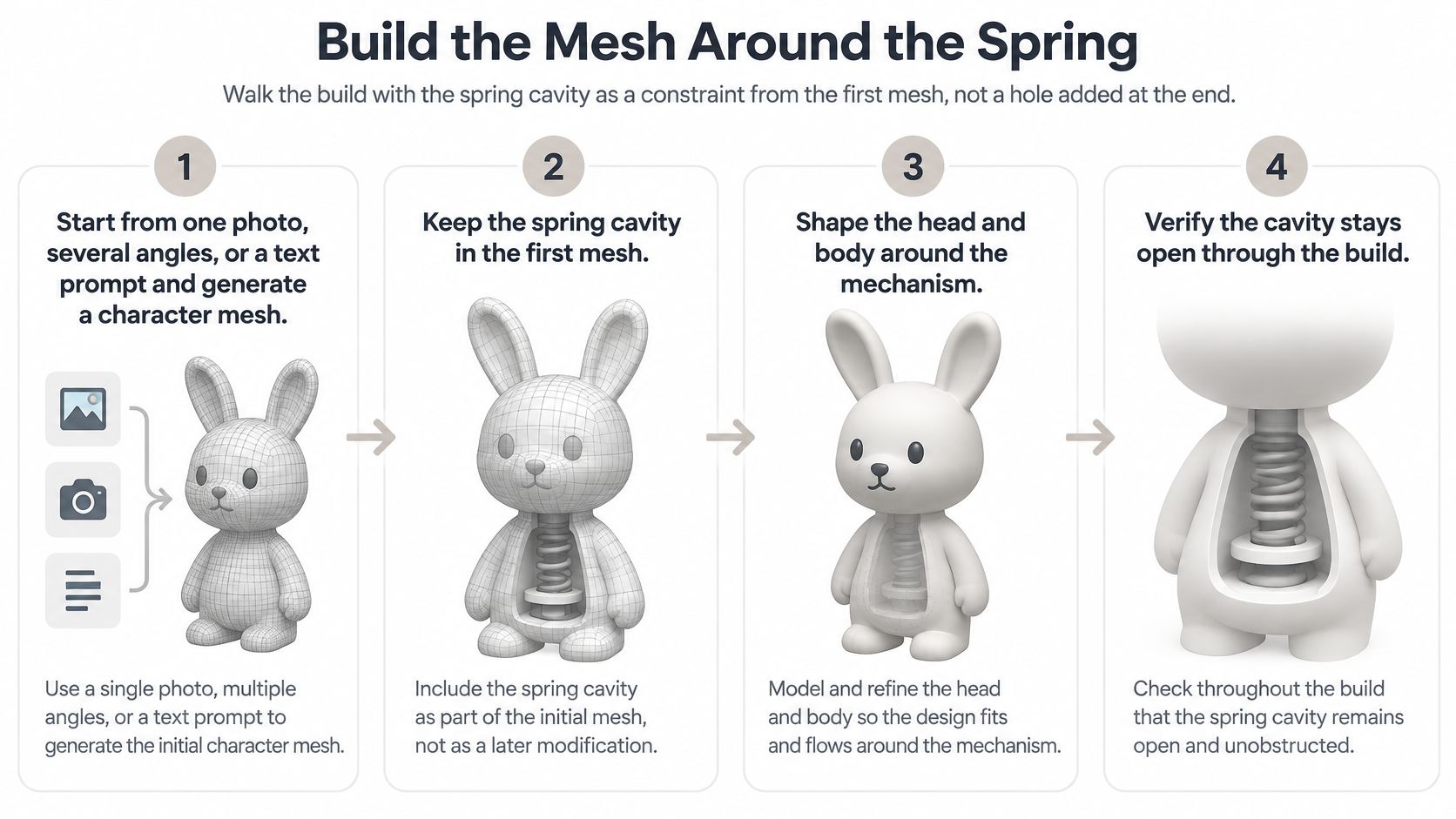
Treat the spring cavity as part of the initial design, not a hole to drill through a finished sculpture. A narrow sculpted neck may look elegant while leaving no material around the connector.
For scale, Threedium's bobblehead modeling guidance describes a classic spring as roughly 19 mm long and 6–8 mm in diameter. That's a different connector arrangement from the documented FDM example above, so don't combine their dimensions into a single specification.
This process keeps the mechanism visible while you develop the character.
Establish the character and its mechanical space
Generate or sculpt a starting likeness. Use a photograph, several reference views, or a text prompt to create the character. Blender is suitable for editing the resulting mesh and adding precise mounting geometry. Keep a separate, untouched copy of the original character so mechanical revisions don't destroy your starting point.
Choose a display size before refining detail. Place the figure beside a simple digital stand-in for its intended shelf or desk space. Enlarge the head for the bobblehead silhouette, but inspect the underside immediately: a broad jaw, collar, or beard can obstruct movement.
Place a placeholder for the connector. Represent the spring and its attachment ends with simple geometry. Reserve a surrounding movement envelope as well. The placeholder shows where the connector sits; the envelope shows where the moving assembly must remain unobstructed.
Repair the mesh before hollowing it. Close unintended holes, remove internal fragments, and check for self-intersections. Clean quads and triangulated meshes can both work, but the exported solid must have an unambiguous inside and outside.
A watertight exterior isn't proof that the internals are usable. Inspect sections through the jaw, neck, and crown, especially after remeshing. Automated cleanup can soften a carefully sized opening or merge nearby surfaces.
Shape the shell without weakening the mount
Hollow the head deliberately. Preserve enough shell to survive handling and leave a reinforced region around the socket. Remove material from bulky hair and hats where practical rather than thinning the mounting area to save weight.
Split the head from the body along a planned boundary. Add the neck boss and verify that the receiving hole leaves a continuous ring of material around it. A collar can conceal a sturdy boss, but it must remain outside the head's movement envelope.
Plan supports and export. Adjust ears, hat brims, and costume details so the slicer doesn't need inaccessible supports around the mechanism. Export STL, OBJ, or 3MF, then reopen the file in the slicer and inspect it again.
For additional mesh preparation, the guide to modeling for 3D printing explains the distinction between a visually clean model and a printable solid.
Delay elaborate textures and tiny surface details until the mechanical geometry is stable. A digital material can make hair look convincing without changing its physical weight, while a sculpted mass of hair adds real load above the connector.
Save separate versions for the character, the mechanically edited model, and the exported print file. If a later test calls for more hollowing or a larger boss, you can revise the relevant geometry without rebuilding the likeness.
Print the Spring Before the Shell
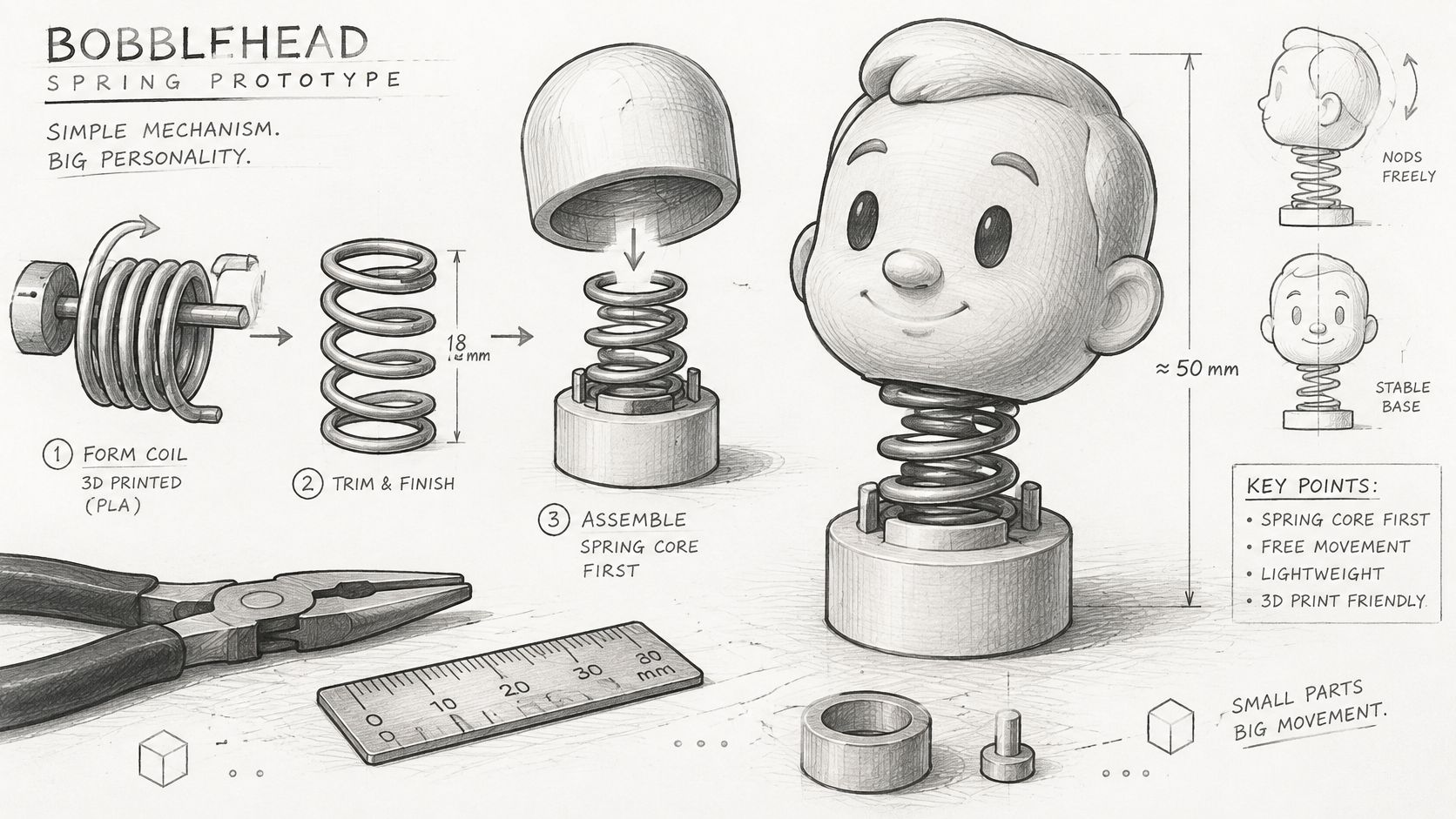
The spring is the inexpensive part to test and the expensive part to discover is wrong after finishing the portrait. Print it alone before committing to the character shell.
Use the sketch to distinguish the connector from the cosmetic parts surrounding it.
Tune geometry against a real load
The 3DPrinty parametric bobblehead spring model provides a starting point using approximately 0.4 mm line width on a 0.4 mm nozzle, forming a two-perimeter spring. Its adjustable geometry also illustrates the central trade-off: more coils generally increase flexibility, while thicker wire or wider spring arms reduce lateral compliance.
Don't assume that a spring needs to be softer because a head is heavier. If the head already sags, extra flexibility can make the problem worse. Reduce the load or increase the connector's supporting stiffness while preserving enough movement for a visible nod.
Check the slicer preview closely. Every spring arm should form continuously, with open gaps where the design requires separation. Reject a print with fused turns, missing extrusion, or damage from support removal.
Use a staged test
- Print the connector alone: Orient it so bending is less likely to pull adjacent layers apart.
- Load it with a stand-in: Use a lightweight temporary head carrying ballast that approximates the intended shell's mass and balance.
- Observe the release: Watch whether it oscillates freely, leans permanently, or touches the surrounding geometry.
- Approve the cosmetic print: Proceed only when the connector supports the load and returns without interference.
A weighted stand-in should approximate more than total weight. A tall hat concentrates mass farther from the mounting point than a compact head, so place the ballast accordingly.
A spring that nods nicely under an empty test cup may behave very differently once the weight sits above or beside its mounting point.
Use the embedded demonstration as a visual companion to the bench test, not as a substitute for checking your own assembly.
Keep the flexing material separate from the finish
Don't choose ordinary rigid SLA resin for a thin, repeatedly flexed connector because it produces crisp detail. Unless the resin is engineered for fatigue resistance, the spring may fracture abruptly. FDM offers a practical starting route, but poor layer orientation can still produce delamination or strand pull-out.
A resin portrait shell with a separate filament spring is a reasonable arrangement. Each component can then use a material suited to its job.
Consult the 3D print settings guide when adjusting extrusion and support behavior. Change the spring geometry only after you've ruled out a badly formed print, otherwise you'll be compensating for a manufacturing defect with a design change.
Seat the Spring Then Paint
Assembly starts with bare, clean mating surfaces. Keep primer, filler, and color away from the mechanism until you've confirmed that the finished geometry moves.
Set the body on a stable surface and dry-fit the connector into both sockets. Support the head while seating it rather than pushing down through the face or hat. Delicate decorative parts make poor handles.
Prove the fit without adhesive
Move the head gently through its intended range. Watch the gap beneath the jaw and behind the head, not just the visible space at the front.
Use this order:
- Seat both ends without glue. Confirm that the connector reaches its intended depth and doesn't bottom out unexpectedly.
- Check the resting position. The head should sit above the shoulders without leaning against the collar.
- Release it from different directions. A forward nod can pass while a sideways movement catches an ear or hairstyle.
- Remove the head and inspect the mounting surfaces for stress marks, scraped plastic, or loosened fragments.
If the assembly needs force to move, stop. Paint won't improve the clearance, and glue won't correct a crooked mount.
Bond the ends and protect the moving section
Use a designed retaining peg where the model provides one. If adhesive is required, choose a product compatible with both materials and place a small amount on the intended attachment surfaces.
Keep adhesive off the active coils. Apply it with a fine applicator rather than dispensing directly over the assembled joint. Follow the adhesive's ventilation and curing instructions, and don't test the motion while the bond is still setting.
Assembly checkpoint: Inspect the spring from the side before the adhesive cures. A hidden bridge between moving turns is easier to prevent than to repair.
After curing, exercise the head repeatedly by hand and inspect the boss again. A widening seam or pale stress mark is a reason to disassemble and revise, not something to hide under filler.
Finish without changing the fit
Remove the head for finishing if the attachment design permits it. Sand visible layer lines, fill cosmetic defects, and apply primer to the exterior.
- Mask the mechanism: Cover sockets, pegs, and the spring before spraying.
- Keep coats controlled: Don't build a paint ridge along a moving clearance.
- Check compatibility: Test primer and paint on scrap printed in the same material.
- Retest after curing: Confirm that the painted head still clears the body and returns freely.
Filament color may be enough for a simple desk figure. If you hand-paint the portrait, keep the mounting areas bare and clean rather than painting every hidden surface.
A finished bobblehead must still bobble. An excellent face doesn't compensate for a joint immobilized during finishing.
Fix a Head That Locks or Cracks
A head that won't move doesn't automatically need a new portrait. Start by separating a fit problem from a spring problem: remove the head and check whether the connector flexes freely on its own.
If the bare connector moves but the assembled head doesn't, inspect contact surfaces. Look for a polished rubbing mark beneath the jaw, a scraped collar, or debris in the receiving hole.
Bobblehead failures and the reprint change
| Symptom | Likely cause | Next change |
|---|---|---|
| Head will not move | Insufficient clearance or support left in the hole | Clean the bore, then test a looser socket coupon if needed |
| Head rests on the shoulders | Head mass too high or coil too soft | Hollow the head further; if necessary, test a stiffer spring separately |
| Neck cracks after nods | Thin boss or too few perimeters | Add walls or near-solid fill at the socket only |
| Spring snaps | Unsuitable resin or layer separation across the bend | Test a filament spring with a better bending orientation |
| Stiff nod, no return | Glue between coils | Replace the spring and bond only the attachment ends |
| Head wobbles sideways | Misaligned sockets or an off-center load | Check boss alignment before changing spring geometry |
Diagnose the stationary fit first
Remove debris before enlarging anything. A socket containing a support fragment can feel undersized even when the modeled clearance is appropriate.
If the cleaned socket still grips too tightly, reprint the coupon with a larger opening. Don't immediately drill out the finished head: the tool can catch, split the shell, or leave too little material around the mount.
A head resting on the shoulders needs a different diagnosis. Hold it at the intended height and release it gently. If it settles straight down, investigate load and supporting stiffness; if it tips toward a hat or hairstyle, investigate balance as well.
Adding coils generally makes a spring more flexible, so that isn't the first fix for an assembly that already sags. Choose one load or stiffness adjustment and test it independently.
Read the fracture before replacing the part
Inspect where the damage starts. A crack around the socket points toward the boss geometry or local print structure, while separation along a spring layer points toward the connector's orientation or extrusion quality.
The wall thickness guide for 3D printing can help when revising the mounting region. Strengthen the interface rather than making the entire character solid, which adds weight without necessarily repairing the weak point.
Keep a short test log with the file version, material, orientation, and observed failure. Record a concrete symptom such as “jaw contacts collar during backward movement,” rather than “bad wobble.”
Make one diagnostic change per test. Changing clearance, spring geometry, and head hollowing together may produce a working figure, but it won't tell you which adjustment mattered or how to repeat the result for another character.
Call It a Display Piece or a Toy
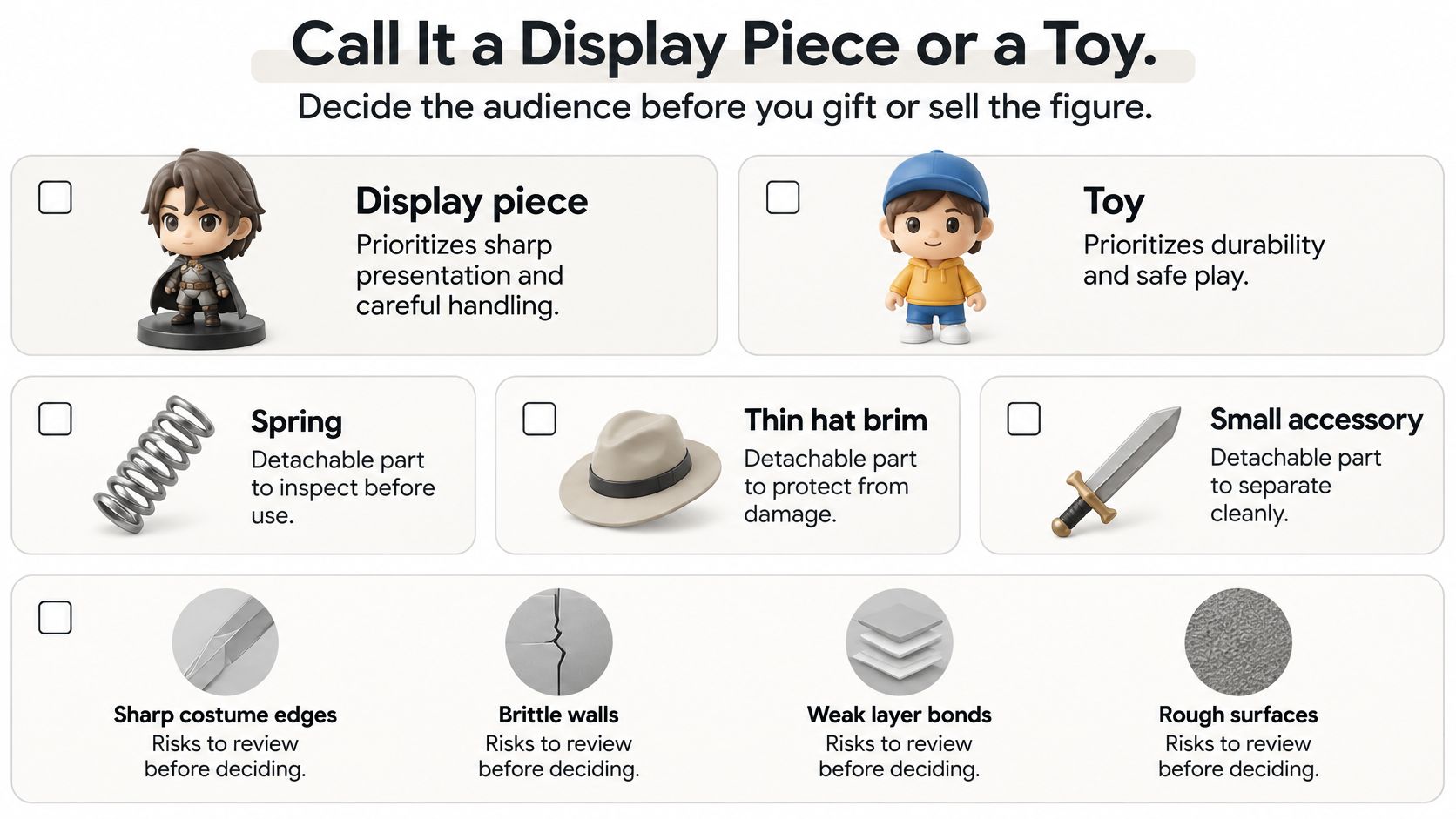
Decide who will handle the figure before giving it away or offering it for sale. An adult desk collectible and a child-directed toy require different design decisions, even when they begin with the same character mesh.
The U.S. Consumer Product Safety Commission's review of potential 3D-printing hazards identifies choking risks associated with figurines and toys, along with concerns about material variability, chemical exposure, and post-production quality control. A clean export and a successful motion test don't establish product safety.
Use the checklist to separate presentation choices from handling risks.
Default to adult display, not unrestricted play
Treat an untested home print as an adult collectible or decorative gift. That description isn't a legal exemption, and a label alone can't override how a product is designed, presented, or likely to be used.
Inspect the physical copy, not just the model:
- Spring retention: Check whether the connector can detach during handling.
- Small accessories: Examine glasses, hands, hat brims, and costume pieces for breakaway risks.
- Edges and fragments: Remove sharp finishing defects and reject cracked or brittle parts.
- Surface treatment: Review coatings and adhesives as well as the base plastic.
- Print consistency: Check each copy for weak bonds, missing extrusion, and damage from support removal.
A material's chemical documentation doesn't establish that the assembled figure is mechanically safe. Nor does a watertight mesh prove that thin accessories will survive a drop.
Separate collectibility from safety
If you intend the figure for children, arrange the appropriate local compliance review and testing before distributing it as a toy. Spring retention, breakaway behavior, coatings, and foreseeable handling all need more than a casual tug at the workbench.
For character collectors, authenticity is a separate question. Lucardio Collectibles' guidance to avoid counterfeit Pokémon figures is useful when buying branded collectibles, but authenticity checks don't replace mechanical safety checks for a homemade print.
Before wrapping a finished figure, inspect it under good light, test its movement, and identify its intended audience. Include handling guidance appropriate to the actual object, especially when it contains a delicate connector or removable parts.
The project is ready only when the mechanism works, the physical copy passes inspection, and you understand what you're giving someone. A recognizable face is the personal part. A dependable, appropriately presented object is the maker's responsibility.
Sculpty offers browser-based photo and text-to-3D generation, remeshing, and STL or 3MF export for preparing a custom character. Visit Sculpty to create your starting likeness, then reserve the spring cavity and test the connector before printing the finished portrait.