
360 Turntable Video: What It Is and How to Export One
Which doubt in the buyer's head does a spinning product remove? Many teams skip that question and go straight to the rig, then wonder why a beautifully smooth loop changed nothing on the product page. The spin is a presentation decision before it's a production job, and the two halves need separate thinking: what the shopper needs to see, and how you'll build and deliver the frames that show it.
Table of Contents
- What a 360 Turntable Video Actually Shows
- Export Settings That Set Smoothness and File Size
- Photo Turntable or 3D Render
- How a Turntable Video Is Built Frame by Frame
- Fixing Wobble, Flicker and Heavy Downloads
- Where a Spin Helps and Where It Does Not
What a 360 Turntable Video Actually Shows
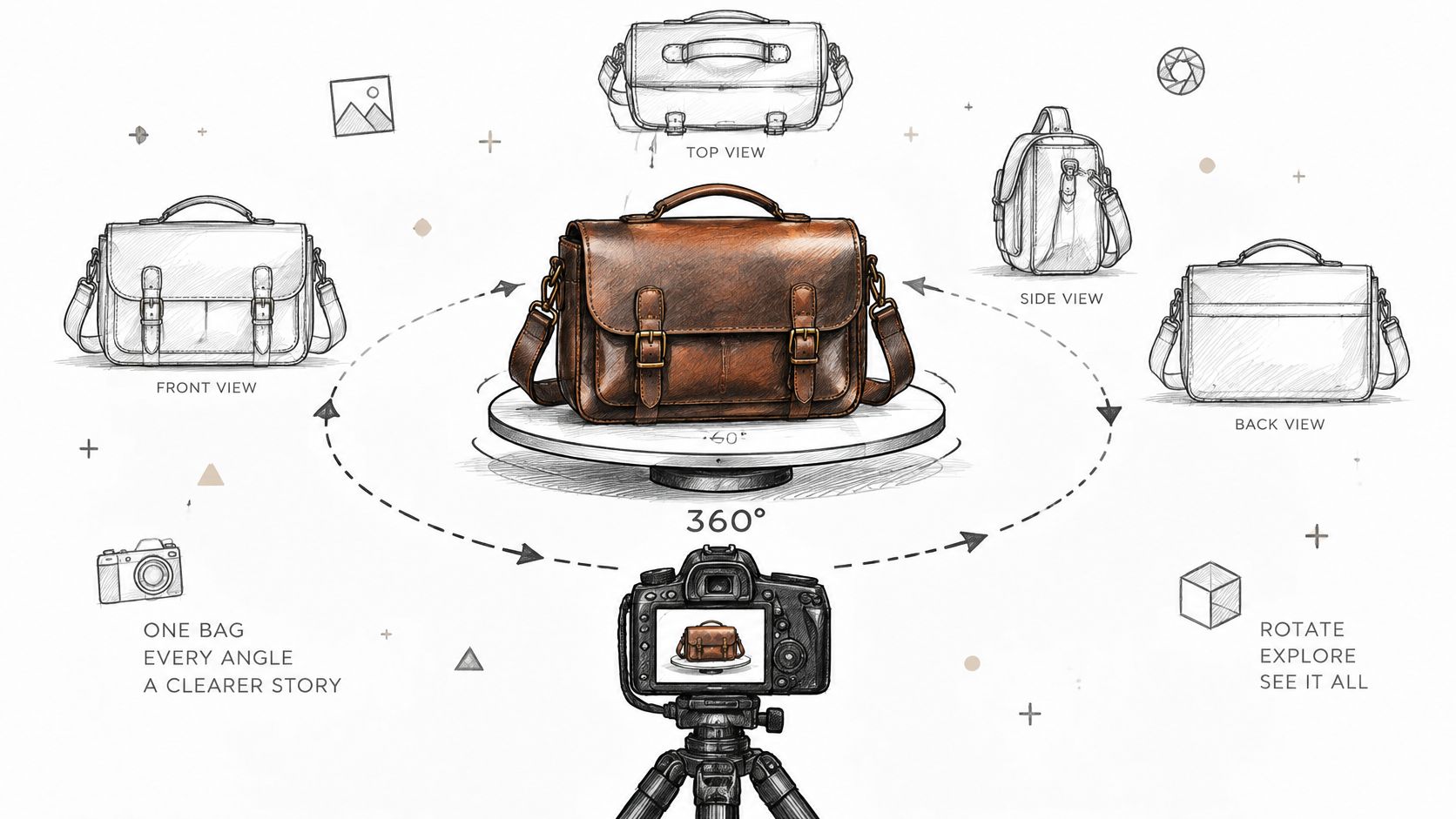
Think of a record player. The platter turns, the tonearm stays where you set it, and the needle reads whatever passes beneath it. A 360 turntable video works on the same principle: the product rotates through a full circle while the camera holds its position, so the viewer sees the front, both sides and the back without anyone handling the item.
The rig behind that idea is simple enough to picture, a product centred on a rotating platform with a camera locked off in front of it.
What the shopper gets is shape and depth in one look. A single hero photo flattens a curved handle, hides the port panel, and leaves the back of the shoe to the imagination. Rotation fills those gaps because the surfaces arrive in sequence, the way they would if the buyer turned the item over in a shop.
Two delivery forms, one rotation
The first form is a looping video file, an MP4 or WebM that autoplays muted in a product gallery or a social feed. Nobody has to touch it. It plays, it loops, it moves on, which makes it the right choice for placements where interaction isn't possible.
The second form is a frame sequence loaded into a web viewer. The shopper drags left or right and the viewer swaps stills, so the rotation follows the finger instead of a timer. That control matters when someone wants to stop on the clasp or the hinge and study it. Same rotation, different relationship with the viewer.
When the spin comes from a 3D model
You don't need a physical sample at all if you have a clean 3D asset. A virtual camera orbits the fixed model under fixed lighting, the renderer writes one image per angle, and those images become either a video loop or a drag sequence. Because nothing physical shifts between frames, the edges and the scale stay identical all the way round, which is the hardest part to guarantee with a camera. If you're still deciding which angles a model needs to cover, the walkthrough on different views of 3D objects is a useful companion before you commit to an export.
Everything that stays still is what makes the rotation readable. Move the camera mid-sequence and the shopper stops trusting the shape.
The format has moved well past novelty. In 2025 the global 360 product photography solution market was valued at USD 2.47 billion and is projected to reach USD 6.89 billion by 2033, according to DataHorizzon Research. That's an industry figure, not a promise about your store.
One clarification worth making early: an object spin isn't a room capture. If your job is a property or an interior rather than a product, the 360 virtual tour photography guide from Jimmy Clemmons Photographer covers that separate discipline, where the camera sits inside the scene instead of outside it.
Export settings, the frame-by-frame build, the repairs for wobble and flicker, and the honest limits of the format all decide whether your spin earns its place on the page.
Export Settings That Set Smoothness and File Size
Start at 36 frames, one image every 10 degrees. For most product pages that's the sensible middle: the rotation reads as continuous on a phone, and the sequence stays light enough to load before the shopper scrolls past. Move away from that default only when the material or the placement gives you a reason.
Frame count is a material decision, not a quality badge. Matte ceramic and cardboard forgive big steps between frames because their surfaces don't change much as they turn. Polished metal and faceted stone don't. A highlight sweeps across a chrome surface fast, and at 24 frames (a 15 degree step) that sweep arrives in visible jumps, so the eye reads it as a stutter rather than a spin. Jewellery, watch cases and reflective hardware justify 72 frames at 5 degrees, and they pay for it in bytes.
Size, background and container
Image size follows the same logic. 1024 px square covers a standard product grid and looks crisp on a phone. Go to 2048 px square when the page offers zoom or a full-screen inspection view, and accept the heavier download that comes with it.
Background is where teams get surprised. A transparent PNG or WebP with an alpha channel lets the same spin sit on a white grid, a dark landing page and a coloured campaign block without a reshoot. The catch is edges: glass, mesh, fine hair and semi-transparent plastic often carry a pale fringe once the matte is cut, and that fringe travels round the whole loop.
Container decides whether the shopper can interact at all. Video files play; frame sequences and GLB files respond to a drag, but they need a viewer script on the page.
| Setting | Option | Best for | Trade-off |
|---|---|---|---|
| Frame count | 24 frames (15 degrees per frame) | Simple shapes and fast loading | Visible steps on glossy surfaces |
| Frame count | 36 frames (10 degrees per frame) | Most product pages | Moderate file size |
| Frame count | 72 frames (5 degrees per frame) | Jewelry, reflective metal, close inspection | Largest files and slowest mobile load |
| Image size | 1024 px square | Standard product grids | Less detail when zoomed |
| Image size | 2048 px square | Zoom and detail views | Heavier download |
| Background | Transparent PNG or WebP with alpha | Placing the spin on any page colour | Halos around semi-transparent edges |
| Container | MP4 or WebM | Video embeds and social posts | No drag interaction |
| Container | Frame sequence or GLB | Interactive viewers the shopper drags | Needs a viewer script and more setup |
Practical rule: pick the lowest frame count that still looks smooth for that material, then raise the pixel size only when zoom or close inspection genuinely needs it.
A worked example makes the trade-off concrete. Say a homeware store sells a glazed mug and a mirrored candle holder. The mug at 24 frames and 1024 px will look fine, because the glaze shifts slowly. The mirrored holder at the same settings will look broken, so it gets 72 frames, and the store keeps it at 1024 px on the grid with a separate 2048 px set behind the zoom button. Two products, two settings, one catalogue.
Keep the masters separate from the web versions. Render or shoot at full resolution once, then generate the smaller variants from these settings rather than re-shooting when the design team changes the page background.
Photo Turntable or 3D Render
Two routes get you the same loop, and they ask for very different things upfront. Settle this before anyone books a studio or opens a modelling tool.
| Route | What you need | Best for | Watch out for |
|---|---|---|---|
| Photo turntable rig | Camera, tripod, turntable, controlled light, physical sample | One-off items, real material texture, packaging | Sample must ship in and every colourway needs a reshoot |
| 3D render from a model | Clean model with correct materials and texture maps, fixed virtual camera | Pre-launch products, colourways, transparent backgrounds | Model quality decides the spin and there is no real-world wear |
| Hybrid photo plus render | Photo master of the hero SKU and a rendered model for variants | Hero SKU plus variant colourways | Two workflows to match on camera height, focal length and light |
The photo route wins on truth of surface. Leather grain, a slightly uneven glaze, the crease in a soft bag: a camera records what's there, including the small imperfections that make a product look real. The cost is logistics. The sample has to reach you, and a navy version of the same bag means another session on the platter.
The render route wins on repeat business. One model with correct materials gives you every colourway by swapping a texture, transparent backgrounds without any cutting, and a spin for a product that hasn't been manufactured yet. Its weakness is equally plain: a sloppy mesh with vague materials produces a spin that looks like a toy, and no render shows real-world wear. If your model came from photos, the notes on multi-view 3D reconstruction explain how coverage affects the geometry you'll be spinning.
The hybrid most catalogues end up using
Photograph the hero SKU so the texture is genuine, then render the variants from a model built to match. The matching is the whole job: same camera height, same focal length, same key light direction and softness. Get those three aligned and the shopper reads one shoot; miss them and the colourway grid looks stitched together.
Kit for the photo route, in the order you'll set it up:
- Sturdy tripod or fixed mount: anything that flexes between shots shows up later as drift.
- Motorised turntable with angle control: a manual lazy Susan won't stop at repeatable steps.
- Two diffused key lights plus fill: soft sources on both sides keep reflections even as the product turns.
- Camera you can lock in manual: exposure, focus and white balance all need to stay put.
- Macro lens for small items: rings and connectors need the detail to fill the frame.
For the render route the kit is a workstation or a browser-based studio and a model you trust. Teams weighing tools can work through this product visualization software comparison from Sprello to see which pipelines handle turntable output directly.
On time, budget a full session for your first photo spin while you find the lighting, then much less per SKU once the rig is saved as a template. Rendering runs unattended, so the effort sits in model preparation rather than in the spin itself.
How a Turntable Video Is Built Frame by Frame
A turntable video works like a record player. The product stays still in meaning, while the viewpoint changes one measured step at a time. The build is a short routine, and every step exists to stop a defect that becomes obvious once the frames loop. Skip one and you usually find it after the files are already on the page.
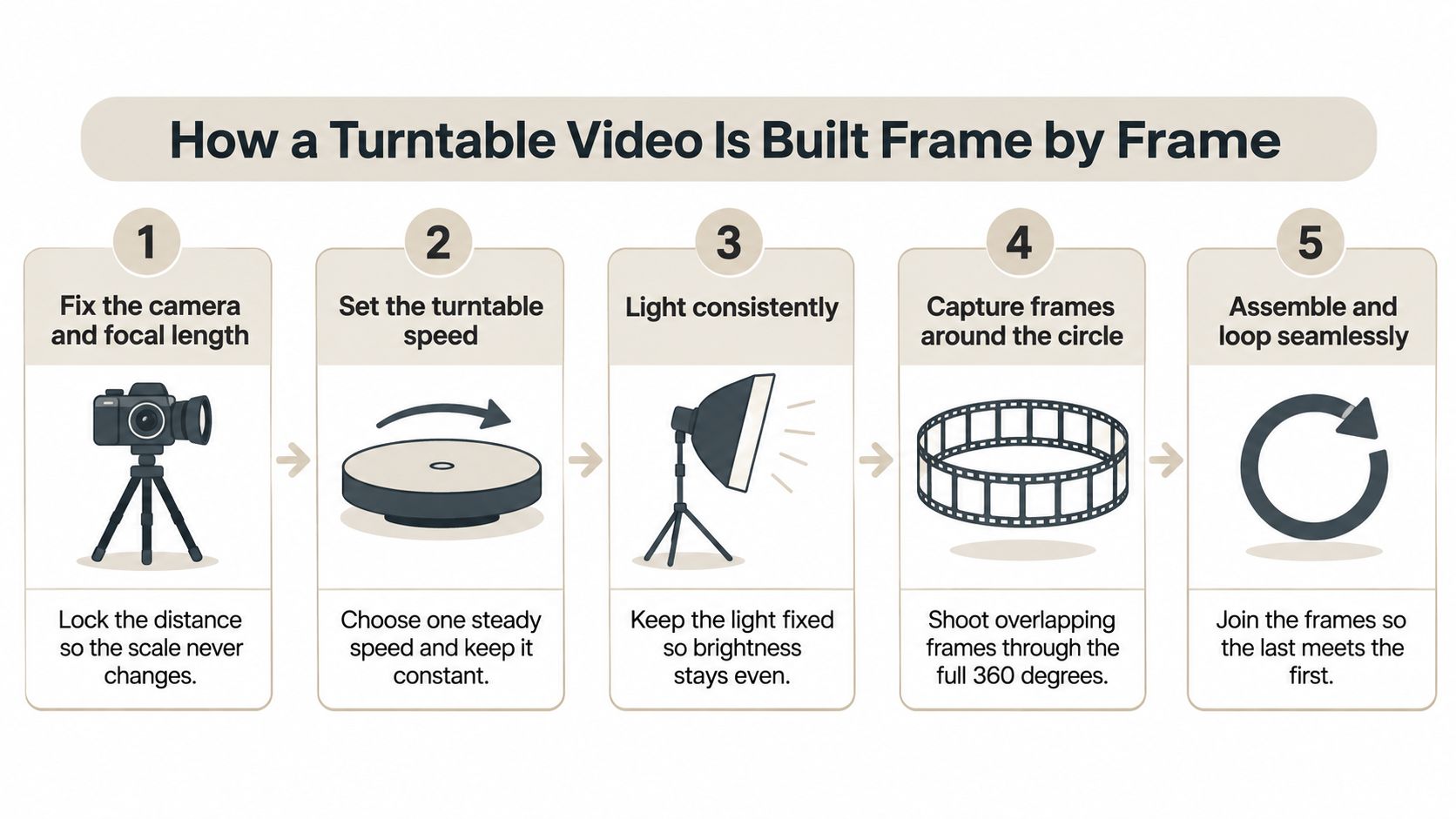
Lock the camera and the focal length. Set the tripod, tape the legs' position on the floor, and leave the zoom ring alone. Distance changes read as scale changes, and a product that grows and shrinks as it turns looks wrong even when every frame is sharp.
Set the light, then go fully manual. Meter once, write down the aperture, shutter and ISO, and switch white balance off auto. Auto exposure re-meters as a bright side rotates into view, and that re-metering produces flicker.
Centre the product on the axis of rotation. Use the centre of the object's own footprint, not the centre of the platter. Spin it by hand and watch the silhouette. If the outline swings side to side, nudge the item until it holds still. Mark the platter and the product position with tape so you can reset after a bump.
Capture one frame per step, in one direction. Use the frame count you settled on and let the turntable index between shots. Keep every pass in the same direction, and use a remote release where possible, because pressing the shutter by hand moves the camera a fraction each time.
Compare the first and last frames. Put them side by side at full size. The last frame should sit one step behind the first, so the loop closes without a hitch. If you shot a full 360 and landed back on the starting angle, you have a duplicate frame, and that duplicate reads as a pause.
Review sharpness across the whole sequence. Scrub through at 100 percent. A single soft frame, usually where autofocus grabbed something else, is more noticeable in motion than in a still gallery, so replace it.
Export, then archive separately. Write the web version at your chosen size, background and container, and keep the full-resolution masters in their own folder with the SKU and angle range in the filename. When the page template changes next season, you can re-export instead of re-shooting.
The loop is the product. One bad frame in thirty-six is a defect the shopper sees every three seconds.
For a 3D asset the logic stays the same, with virtual parts. Fix the camera's orbit radius and height, keep the light rig static, and let the renderer write one transparent frame per angle. A constant-speed orbit is usually set up with keyframes or a path constraint in a 3D package. Because the camera path is mathematical, steps 1 and 3 are solved by construction, which is why rendered spins often look cleaner on the first pass. The same orbit logic also appears in broader Blender motion work, including this guide to animating a character in Blender, but a product spin needs a fixed camera path rather than character movement.
Two habits save the most rework. Shoot a low-resolution test rotation before the main capture, so lighting problems surface while the product is still on the platter. Name files by angle, not by capture order, so a replaced frame drops straight into the sequence without renumbering everything after it.
Teams comparing a documented studio workflow against their own set discipline will find BEDHEAD's guide to 360 spin production useful on set discipline and handoff, particularly when more than one person shoots across a catalogue.
Fixing Wobble, Flicker and Heavy Downloads
Wobble is the failure that ruins the most spins. The frames can be perfectly sharp and the loop still looks broken, because the object's centre drifts a few pixels left and right as it turns and the eye reads that sway as a mistake. It comes from a moved platter or a shifted camera, and no amount of extra frames fixes it.
The rest of the defects follow the same pattern: a physical cause, a visible symptom, a specific repair. ProductPhoto's tips for successful 360 product photography stress that camera, exposure, white balance, focus, framing, lighting and product position all have to stay fixed, since even small shifts produce wobble, flicker, inconsistent scale or a visibly broken loop.
| Symptom | Likely cause | Fix |
|---|---|---|
| Wobble or drifting centre | Turntable moved or camera shifted | Lock the camera, mark the turntable position, and reshoot |
| Flicker across frames | Exposure or white balance changed between shots | Set manual exposure and white balance before capture |
| Inconsistent scale | Focus or distance changed during the spin | Fix focus and distance for the whole sequence |
| Visible jump at the loop | First and last frames differ | Adjust the rotation so the last frame leads into the first |
| Halo around edges | Hard matte on a semi-transparent object | Refine the alpha edge or add a soft shadow catcher |
| Slow load on phones | Too many large frames | Lower the image size or frame count and test on mobile |
Test the page, not just the render
A finished render isn't a finished page. Load the viewer on a mid-range phone over a throttled connection and watch what the shopper sees in the first seconds. If the gallery shows an empty box while thirty-six large images arrive, the spin has made the product slower to discover, which is the opposite of what you wanted.
Run the comparison. Export the same SKU at two frame counts and two pixel sizes, load each on the phone, and judge whether the smoother version looks enough better to justify the wait. On matte products it often doesn't. On reflective ones it usually does. That test takes minutes and settles an argument that no general rule can.
Give people a way out
Some shoppers can't drag a viewer, whether because of a motor impairment, a keyboard-only setup, an old browser or a connection that won't carry the sequence. Ship a static hero image as the default and layer the interactive spin on top, so the page works before the script loads. A short autoplaying video is a reasonable middle option for slow connections, and a poster frame means something appears instantly either way.
Before anything goes live, walk this list:
- Centred rotation: scrub the loop and watch the silhouette for sideways sway.
- Consistent lighting: no frame brighter or warmer than its neighbours.
- Clean join: last frame leads into first with no duplicate and no gap.
- Correct direction: the spin runs the way your other products run.
- Sharpness: every frame checked at full size, soft ones replaced.
- Transparent edges: inspect against both white and dark backgrounds for halos.
- Mobile load: tested on a real phone, on a throttled connection, with the fallback visible.
Where a Spin Helps and Where It Does Not
A spin is a tool for a specific kind of doubt. The useful question is simple: what stops this shopper from feeling sure, and can rotation answer it? If the hesitation is about surface, shape, hardware or how the object sits in space, a turntable can do real work. If the hesitation is about ingredients, measurements or compatibility, the spin is just motion.
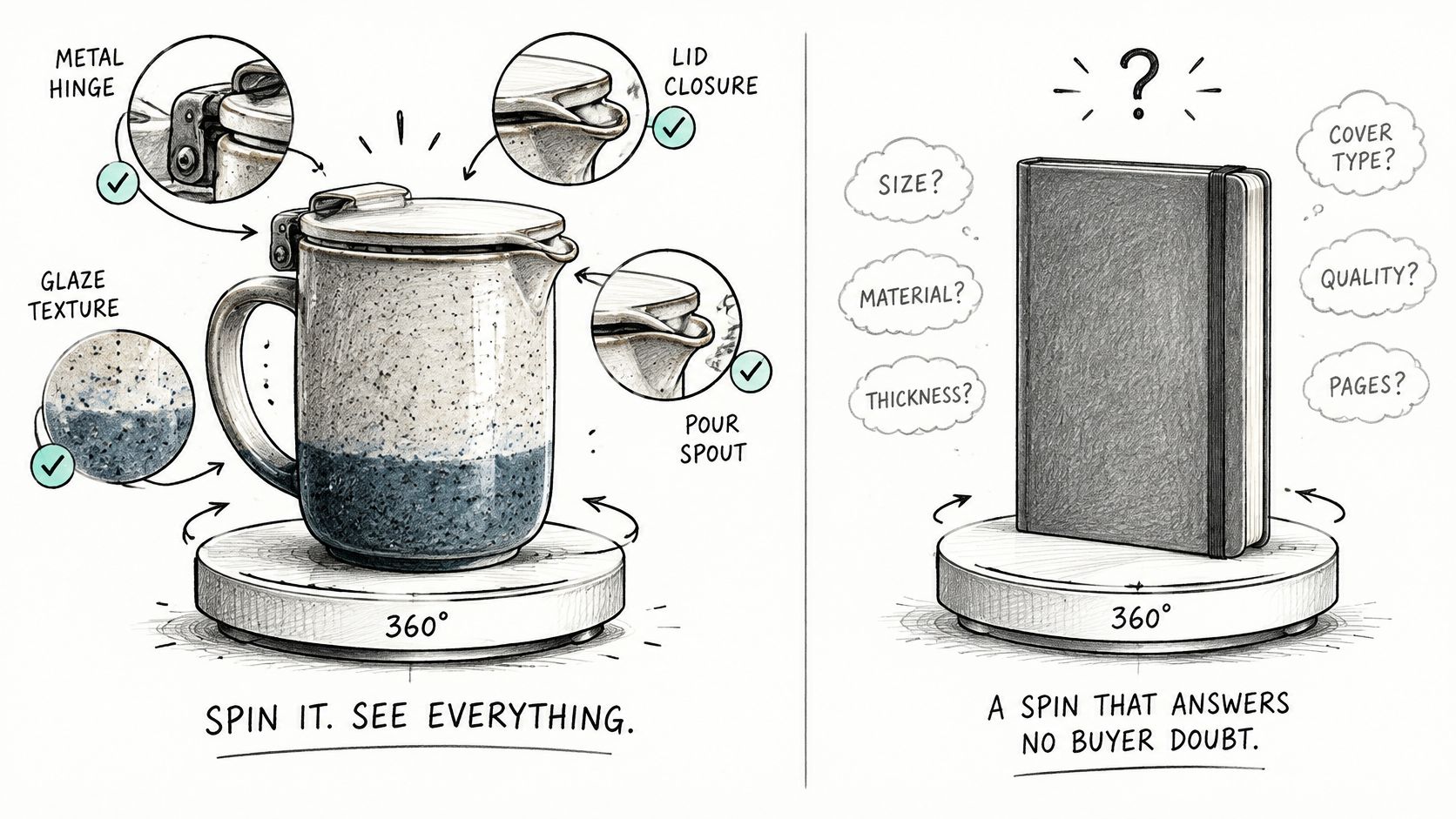
A record player offers a useful comparison. The needle does not make the album better. It reveals the part that was waiting to be heard. A turntable does the same for a product: it reveals the back, the edges, the finish and the small construction details that a hero shot hides. Guidance on 360 product photography from Acquire Convert makes the same distinction, recommending rotating views for inspectable physical detail while warning that those views are a poor substitute when the objection is better handled by specifications, comparison charts or FAQs.
| Product or question | Does a spin help? | Better companion |
|---|---|---|
| Jewelry and watches | Yes, shows facets and metal finish | Macro detail shot and size reference |
| Footwear | Yes, shows silhouette and sole | Fit guide and size chart |
| Electronics with ports | Partly, shows form and hardware | Port close-up and spec table |
| Packaging | Yes, shows closures and opening | Short unboxing demo video |
| 3D-printed objects | Yes, for shape checks | Dimension drawing with scale reference |
| Ingredients or compatibility | No, a spin does not answer it | Spec table or FAQ |
Read that table as a pairing rule rather than a final verdict. Footwear spins well because the silhouette matters, but fit still belongs to the size chart. A router can look convincing from every angle and still leave buyers counting ports, so a labelled close-up settles the question faster. A supplement bottle may have a clean reflective finish, yet the buyer's real question is what is inside. The spin can look polished while the useful answer sits elsewhere on the page.
Hidden function is the clearest limit. If the value is a folding mechanism, a magnetic closure catching, or a screen changing state, use a demonstration video. A turntable shows the outside going around. It does not show the action that makes the product worth buying.
Here's a walkthrough of the format in practice, useful for seeing how a spin reads on a real product page.
Measure by SKU instead of promising a lift
Conversion claims around 30 to 50 percent appear in Acquire Convert's overview of 360 product photography as case-study aggregates, which makes them useful as examples, not as a forecast for every catalogue. Treat the range as a sign that the format can work in the right context. Treat your own catalogue as the place where the answer has to be measured.
Measure this: gallery engagement, dwell time, add-to-cart rate, return reasons and support questions, tracked per SKU.
Choose one SKU with a spin and a comparable SKU with static images only. Match them on price, category and traffic source so the comparison is not lopsided before it starts. Return reasons and support questions deserve special attention, because a spin that resolves an inspection doubt should reduce messages like “looked different in person” or “what does the back look like.”
For teams working from 3D assets, Sculpty is one option for the production side. It turns a 3D model or a logo file into a 360-degree animation with transparent-background export, supports GLB, OBJ and FBX outputs, includes free web viewers for checking the spin in a browser, and grants commercial usage rights on paid plans. That keeps the frame production and quality check in one place, while the SKU comparison still decides whether the spin earns its space.
A first test can stay small. Take one SKU where shape and surface matter, export at 36 frames and 1024 px on a transparent background, run the pre-publication checklist, load it on a phone, and compare it against a similar static SKU for two to four weeks. If the spin moves the numbers that matter, roll it out to products with the same doubt. If it does not, keep the format for cases where rotation answers a question buyers ask.