
Free Car Design Software: Best Picks and Workflows for 2026
A student opens a blank viewport, sketches a low-slung electric coupe, and then discovers that the software used in professional automotive studios costs more than the project budget. A hobbyist may have the opposite problem: plenty of ideas, a 3D printer ready to run, but no reliable way to turn a stylized body shape into a dimensionally accurate bracket, housing, or wheel component.
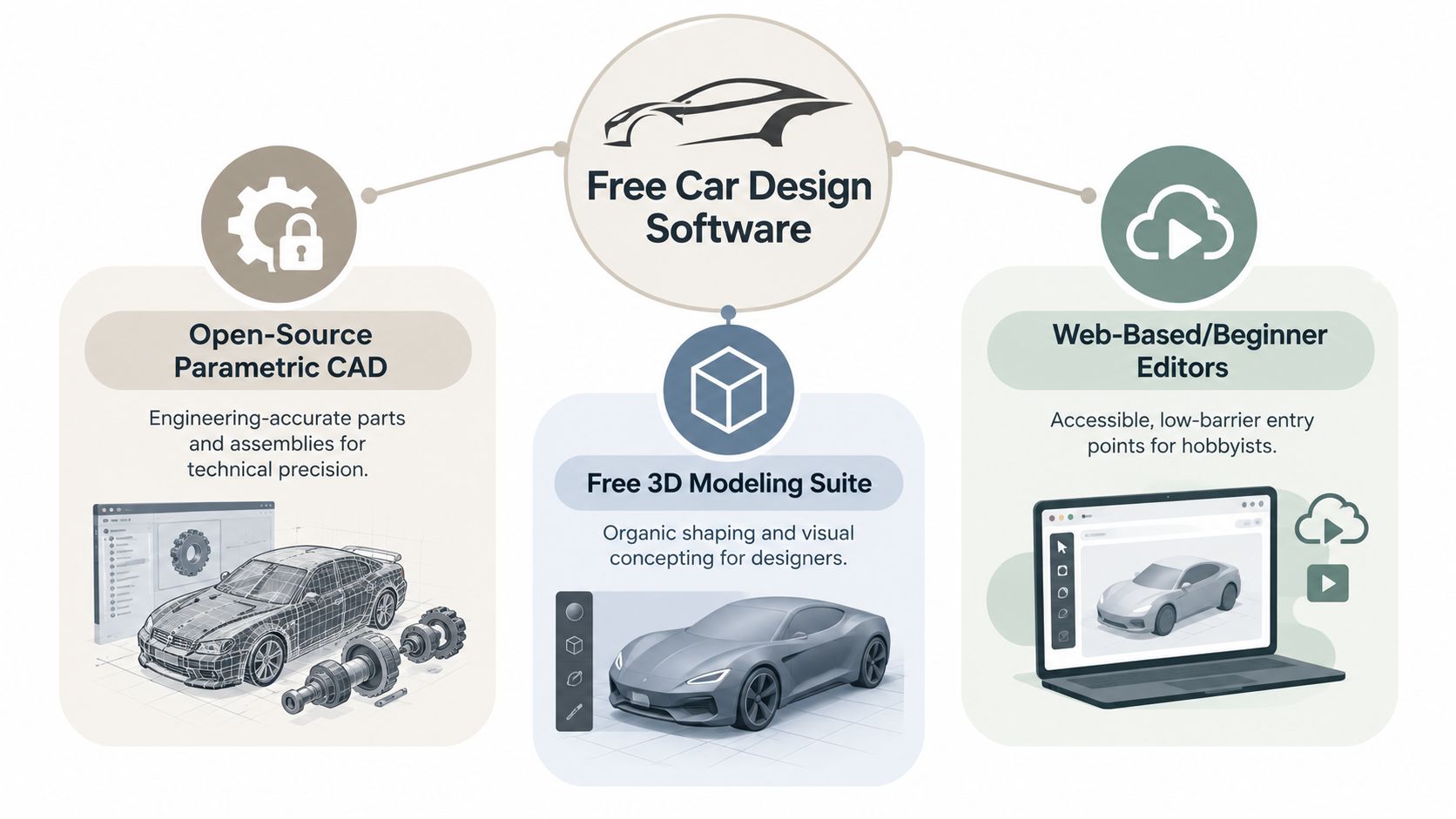
That's why the search for free car design software can be misleading. The phrase covers at least three different jobs: shaping a vehicle concept, building parts with engineering control, and producing a convincing presentation render. Free tools can handle all three stages, but no single option handles them equally well.
The practical answer is a workflow, not a winner-takes-all download. This guide compares desktop CAD, free 3D suites, browser-based editors, and AI-assisted tools by the role they play in a project. It also shows where files move cleanly between applications, where collaboration becomes awkward, and when a free stack has reached its sensible limit. For an accessible introduction to AI-assisted 3D modeling, see this guide to AI 3D modeling.
Table of Contents
- Why Free Car Design Software Has Become a Serious Option
- The Landscape of Free Tools in Automotive Design
- Free Car Design Tools Reviewed by Strength and Limitation
- Comparing Tools Across the Car Design Workflow
- Best Free Software for Each Type of Car Designer
- Chaining Free Tools Into One Car Design Pipeline
- How to Choose and When to Move Beyond Free Tools
Why Free Car Design Software Has Become a Serious Option
A decade ago, “free” often meant a stripped-down viewer, a hobbyist application, or a tool that could produce attractive shapes but not useful geometry. That distinction has narrowed. Open-source CAD, mature polygon modeling, procedural workflows, and browser-based generation now cover a much larger part of the path from rough idea to shareable asset.
The real problem is choosing the right job
Suppose the student in the opening example wants to design a compact vehicle. The first task is visual. They need to explore proportions, glass area, wheel placement, character lines, and the relationship between the cabin and body. Blender is well suited to this stage because it supports freeform modeling, sculpting, materials, lighting, and animation in one application.
The second task is technical. A mounting tab, battery enclosure, dashboard bracket, or suspension-adjacent fixture needs dimensions that can be edited without destroying the rest of the model. That's where parametric CAD matters. A mesh that looks correct in a render may be useless for manufacturing if its wall thickness, hole diameter, or mating surfaces aren't controlled.
The third task is communication. A client, tutor, supplier, or online collaborator may not need the native scene file. They may need a rendered image, a lightweight 3D viewer file, a manufacturing export, or a browser-accessible review.
Practical rule: Choose software based on the next handoff, not just the first shape you want to make.
Free tools are now credible for learning, concept development, maker projects, visual production, and some production-adjacent tasks. They still require judgment. Large assemblies can become cumbersome, automotive surfacing remains demanding, and desktop applications rarely solve review, permissions, and version history on their own.
The useful question isn't “Which free program replaces every professional package?” It's “Which combination lets me move from concept to clean model to usable presentation without paying for capabilities I don't need yet?”
The Landscape of Free Tools in Automotive Design
The free-tool space divides into three practical families. Open-source parametric CAD is built around dimensions, constraints, features, and editable mechanical relationships. Free 3D creation suites prioritize shape exploration, sculpting, materials, lighting, and animation. Web-based or AI-assisted studios reduce installation and setup friction, helping users generate or review geometry through a browser.
The economic context explains why these categories matter. Automotive is the largest end-user industry in one 2024 CAD and PLM market study, representing 28.3% of global revenue, or $22.2 billion according to market analysis of CAD and PLM software. Premium platforms dominate major OEM workflows, but education, maker communities, independent designers, and smaller suppliers often need a lower-cost entry point.
Open-source CAD emerged as a meaningful category during the 2000s. FreeCAD belongs to that development wave. It was released in 2002, runs on Linux, Unix, macOS, and Windows, and reached its 1.0 release in November 2024 after more than 20 years of development, as documented in this overview of CAD software. That history matters because software maturity affects trust. A tool with a long development arc is easier to evaluate than a promising project with no stable workflow.
Three categories, three expectations
Parametric CAD is the right starting point when a component must be dimensionally controlled. Think brackets, housings, fixtures, wheel adapters, or simple assemblies. It's less comfortable for a flowing exterior surface that needs constant visual sculpting.
Blender and similar 3D suites are stronger for a complete visual concept. They let you work with polygonal forms, curves, modifiers, sculpting, UVs, materials, and rendered cameras. They're also better suited to animation and game-oriented asset work, although engineering edits require more discipline.
Browser and AI-assisted tools address speed and accessibility. They can help create a starting mesh, convert reference imagery into an asset, or provide a convenient review surface. They don't remove the need for cleanup. Generated geometry still needs inspection, especially around symmetry, topology, thin surfaces, openings, and manufacturing interfaces.
A beginner sketching a fantasy supercar should start with a visual tool. A maker designing a printable pedal mount should begin with CAD. A distributed indie team exploring several body styles may benefit from a browser-based concept stage before committing to detailed modeling. The category should follow the design intent.
The following video provides a visual introduction to the wider range of modeling tools.
Reference-driven workflows can also begin from photographs rather than text or sketches. This photo-to-3D model software guide is relevant when the starting point is an image set or visual reference.
Free Car Design Tools Reviewed by Strength and Limitation
A car project often starts with a rough body shape, then shifts toward measurable parts, materials, lighting, and an export someone else can inspect. FreeCAD and Blender serve different stages of that process. The right choice depends on whether the immediate output is a controlled component, a flexible concept, or a presentation-ready image.
FreeCAD for dimensioned vehicle components
FreeCAD is the most relevant unrestricted option for mechanical car design. Its parametric workflow suits parts where dimensions, constraints, and feature history must remain editable. A bracket can be revised by changing a sketch constraint. A housing can be adjusted through its wall or hole features instead of pushing individual mesh vertices.
Independent comparisons describe FreeCAD as a general-purpose open-source mechanical CAD application available for Windows, macOS, and Linux. It fits brackets, housings, fixtures, mounts, and other vehicle components, especially when the design may move toward fabrication or 3D printing. It also provides a clearer handoff for someone who needs to inspect dimensions rather than only judge the appearance.
FreeCAD differentiator: Use it when the question is “Can I change this dimension safely?” rather than “Can I make this surface look dramatic?”
FreeCAD becomes harder to manage as an automotive project grows into a dense assembly with many dependent features. Its performance can degrade on large, feature-heavy models, and recompute delays make exploratory work less comfortable than in a polygonal modeler, as discussed in this comparison of free CAD software. A planned feature tree helps, but FreeCAD remains better suited to selected components than to an entire, highly detailed vehicle assembly.
Blender for form and presentation
Blender is the stronger free option when the goal is visual development or presentation. It combines polygon modeling, sculpting, modifiers, UV work, materials, lighting, animation, and rendering in one desktop application. For automotive stills, Cycles can produce photorealistic results with suitable HDRI lighting and a carefully built car-paint material, according to this review of car design software.
Blender works well for refining a vehicle silhouette, fender volume, grille treatment, lamps, aero surfaces, and camera composition. It is also a practical choice for a turntable, game asset, pitch image, or design review sequence. A concept can move from rough blockout to polished render without leaving the scene, which makes Blender useful between initial sketching and collaborative presentation.
Blender differentiator: Choose it when the model must communicate proportion, surface quality, and mood before engineering validation.
Precision management is Blender's main limitation. It can model a functional part, but it does not automatically provide the constraint-driven history that makes mechanical revisions predictable. Boolean-heavy hard-surface work may leave messy topology, while a convincing exterior mesh may not suit machining, injection molding, or reliable parametric editing. A clean hard-surface modeling guide explains why bevels, support loops, surface continuity, and controlled edge transitions matter.
Smaller tools have a role
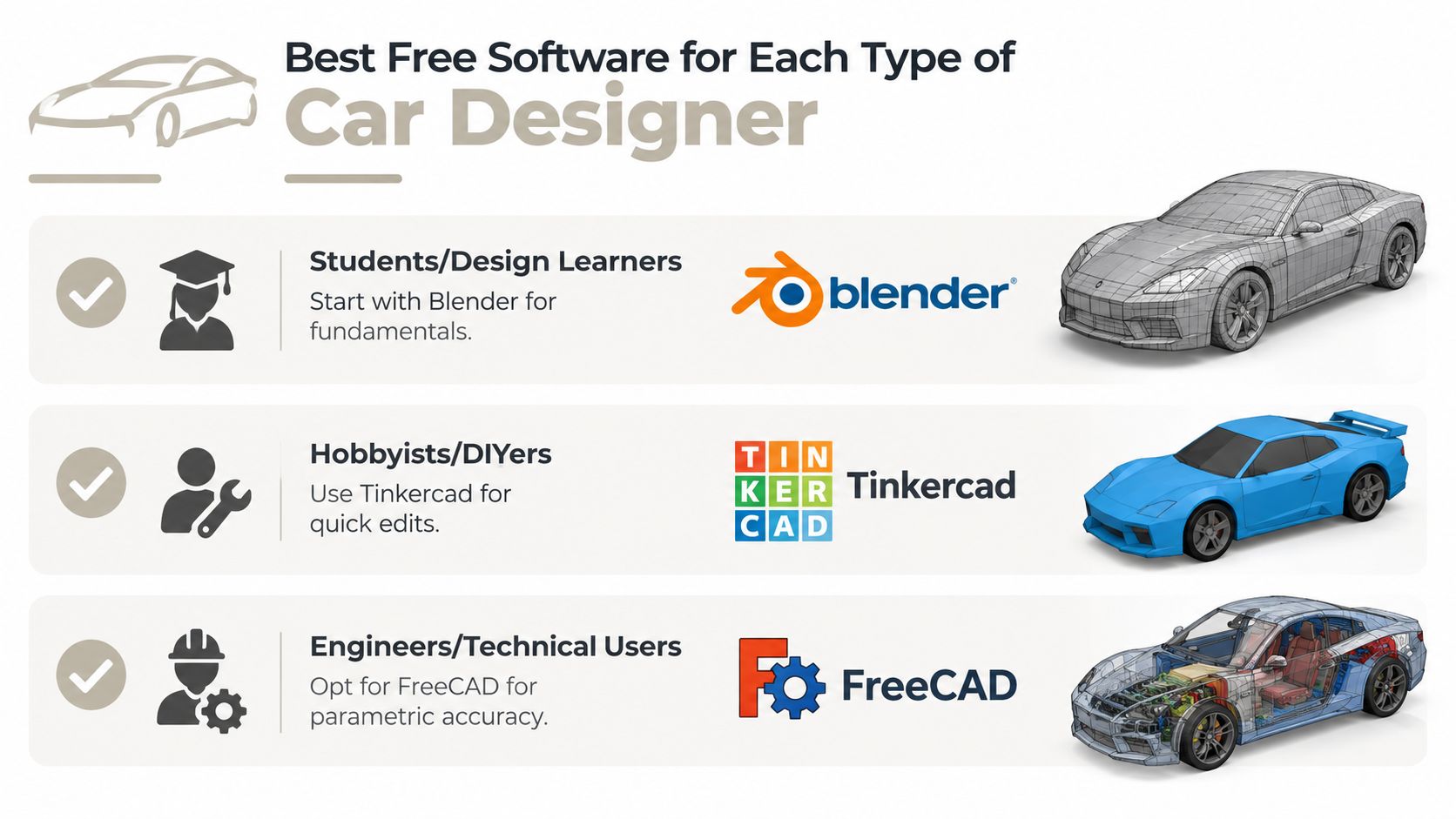
Tinkercad and similar beginner-friendly editors handle simple shapes, quick edits, and introductory solid construction. Their speed makes them useful for learning primitives, alignment, grouping, and export. They become restrictive when a vehicle concept depends on flowing bodywork, controlled surface transitions, or a complex assembly.
Browser-based tools can also give distributed teams a convenient place to review an early concept or exchange a simple export. AI-assisted and procedural workflows can accelerate setup and variation, but every generated result still needs checks for symmetry, watertightness, editability, and downstream fit. Teams exploring that part of the process can find design automation resources for background and workflow ideas.
| Tool | Best For | Platforms | Key Limitation |
|---|---|---|---|
| FreeCAD | Dimensioned parts, brackets, housings, and mechanical components | Linux, Unix, macOS, Windows | Can slow down on large, feature-heavy assemblies |
| Blender | Vehicle concepts, hard-surface modeling, materials, animation, and photorealistic renders | Desktop operating systems | Precision and topology require manual discipline |
| Tinkercad | Beginner solid modeling and quick simple edits | Browser-based | Limited for advanced surfacing and complex automotive work |
Use the tools as a chain rather than forcing one application to cover every stage. Blender can establish the visual direction, FreeCAD can formalize a selected mechanical part, and a browser-based editor can support review or handoff. The export boundary is where errors appear, so inspect scale, normals, topology, naming, and editability before passing the model onward.
Comparing Tools Across the Car Design Workflow
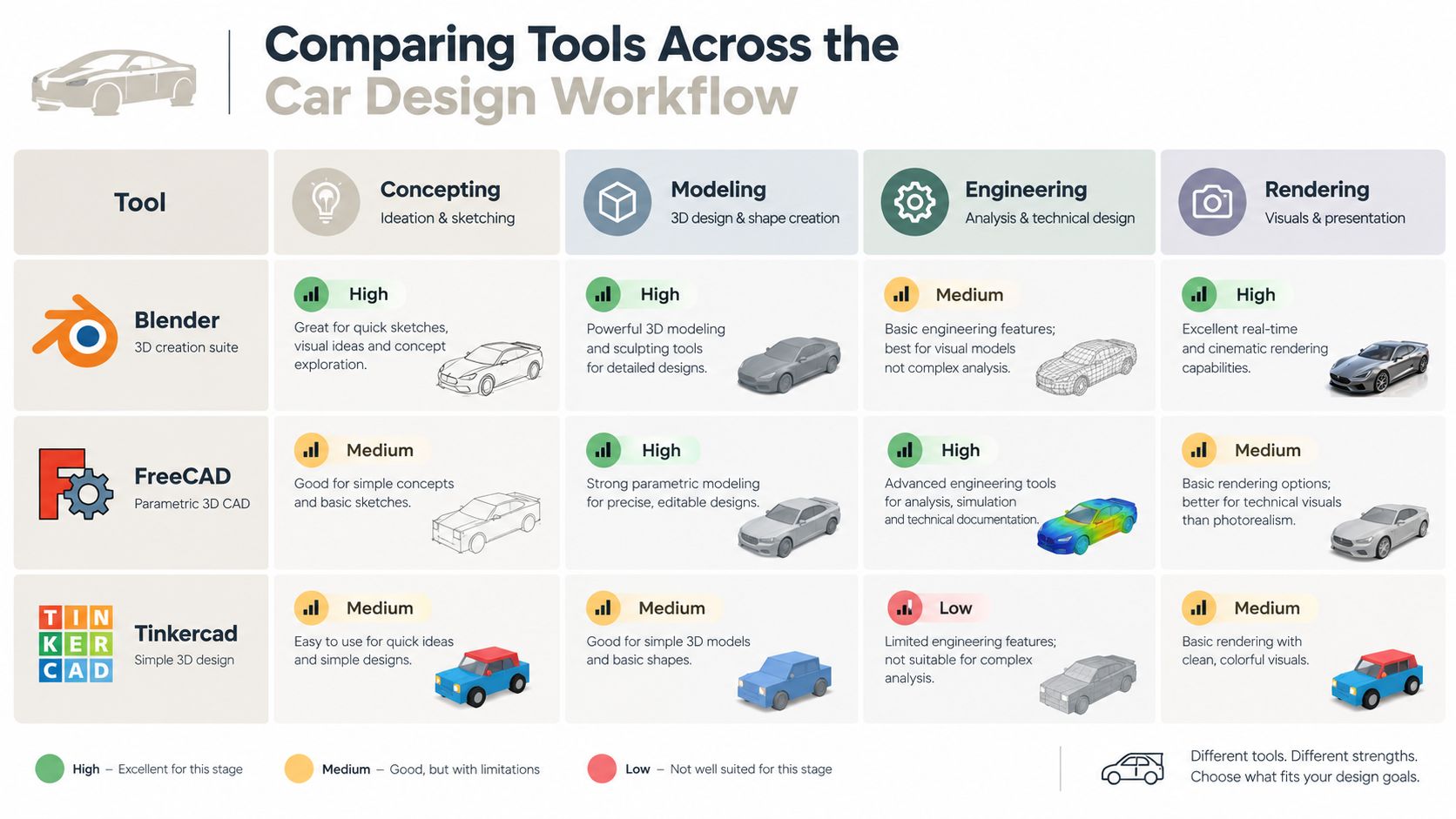
A tool-by-tool list hides the decisions that cause projects to stall. The better comparison asks what happens at each stage: how quickly can you test an idea, how precisely can you control the model, how good is the final presentation, and how easily can another person inspect or continue the work?
Concepting speed
Blender gives the broadest creative range among the main desktop options. You can block out a body with primitives, mirror the form, add subdivision, pull major surfaces into place, and test a camera without leaving the same scene. It rewards visual iteration.
FreeCAD is slower for that kind of loose exploration because each form is tied to sketches, features, or deliberate solid operations. That slower pace is useful when the concept has already become a part specification, but it can interrupt early ideation.
Tinkercad is fast for basic solids and educational exercises. It becomes restrictive when a concept depends on flowing bodywork, controlled surface transitions, or a carefully managed mesh.
Modeling precision and topology
FreeCAD leads for dimensioned mechanical parts. Its purpose is to describe real-world objects through editable parameters, which makes it the natural home for components that need repeatable measurements.
Blender offers more direct control over topology and surface appearance, but that control comes with responsibility. A model can look finished while hiding stretched polygons, non-manifold regions, accidental internal faces, or poor deformation flow. For a static render, some of those problems may not matter. For a game asset, animation, or downstream conversion, they can become expensive.
Rendering and presentation
Blender wins this stage. Cycles, HDRI lighting, camera control, procedural materials, and compositing support a polished automotive image. FreeCAD can communicate geometry, but it isn't the tool I'd choose for a hero render or a client-facing vehicle reveal.
Collaboration and export flexibility
Neither FreeCAD nor Blender, by itself, is a complete browser review system. Teams commonly export files, exchange screenshots, or send a STEP, OBJ, or GLB through another channel. That works for a small project, but it creates uncertainty about which revision is current and whether comments refer to the same geometry.
| Workflow criterion | Blender | FreeCAD | Tinkercad |
|---|---|---|---|
| Concepting | Strong for rapid visual exploration | Better once dimensions matter | Fast for simple primitives |
| Modeling | Flexible mesh and hard-surface control | Strong parametric part modeling | Accessible but limited |
| Engineering | Manual and workflow-dependent | Strongest of the three | Basic |
| Rendering | Strongest option | Functional but secondary | Minimal |
The collaboration gap is becoming more visible as cloud-native CAD, real-time collaboration, and AI-assisted workflows gain attention. Users increasingly expect browser access, shared review, and faster iteration, while desktop-only workflows still push teams toward local installs and file exports. The practical future of free car design software is therefore not only free modeling. It is a connected chain in which people can generate, inspect, revise, and export without losing context.
Best Free Software for Each Type of Car Designer
The best stack changes with the person using it. A student learning visual design has different constraints from a maker producing a printable component, and neither needs the same workflow as a freelancer presenting a vehicle concept to a client.
Students and design learners
Start with Blender as the primary tool and use a browser-based editor for quick exercises. Blender teaches transferable ideas: object hierarchy, transforms, modifiers, topology, UVs, materials, lights, and cameras. Those fundamentals apply to cars, products, environments, and game assets.
The learning curve is real, but the software exposes enough of the complete visual pipeline to make practice meaningful. A learner can move from a rough blockout to a finished render without needing a separate application for every stage.
Hobbyist makers and 3D printing enthusiasts
Use FreeCAD as the main application and Blender as a support tool for visual references or non-functional styling. FreeCAD is the better home for printable brackets, mounts, clips, housings, and adapters because dimensions and feature relationships remain visible during revision.
Check the final export in the intended slicer. STL is common for printing, while 3MF can preserve more manufacturing-oriented project information in workflows that support it. A sculpted Blender mesh can work for a decorative body shell, but it may need watertightness checks, wall-thickness decisions, and mesh repair before printing.
Indie game developers
Choose Blender for the production asset and use browser-based AI assistance for rapid concept variations. Game teams need control over polygon density, UVs, materials, pivots, naming, and export settings. Blender supports that cleanup work more directly than a purely parametric tool.
The supporting tool should help the team test silhouettes and vehicle classes quickly, not replace the final art pass. Generated or imported meshes still need retopology, material assignment, collision planning, and engine validation.
Freelancers and small agencies
Use Blender for hero renders and a browser-accessible review layer for client feedback. A client may care about a 360-degree view, a few lighting variations, and an easy way to comment on the roofline or wheel design. They may not want to install a desktop CAD package or understand a native scene file.
For technical deliverables, add FreeCAD only where dimensions genuinely matter. Keeping every stage in one application sounds efficient, but it often produces weaker results than assigning each tool the job it handles best.
Chaining Free Tools Into One Car Design Pipeline
A practical vehicle project rarely stays inside one application. The exterior may begin as a sketch or generated reference, the visual model may live in Blender, a mounting component may be rebuilt in FreeCAD, and the final presentation may return to Blender for lighting and composition.
Begin with a visual hypothesis
Start with silhouette and proportion rather than tiny details. A written prompt, an image-generation pass, or a rough Blender blockout can explore several directions quickly. At this stage, the model is a design question: Is the cabin too tall? Are the wheels too small? Does the front volume support the intended character?
AI-assisted mesh generation can provide a starting object from text, a single image, or multiple views. A browser-based studio such as Sculpty aggregates several text-to-3D and image-to-3D engines behind one interface, with tools for generation, PBR texturing, remeshing, retopology, rendering, and standardized export. That kind of service can bridge the concept-to-clean-mesh stage without requiring a local install, although the resulting asset still needs inspection.
Refine the mesh in Blender
Bring the concept into Blender for symmetry, proportion, topology, and surface cleanup. Separate major elements such as the body, glass, wheels, lights, trim, and interior. Use modifiers carefully, keep naming consistent, and decide early whether the asset is for a still image, animation, a game engine, or physical output.
Automated retopology can help create cleaner quads or game-ready triangles, but it shouldn't be accepted blindly. Check edge flow around wheel arches, openings, sharp creases, and curved highlights. PBR texturing is useful for speed, but material scale and roughness still need artistic judgment.
Route precision parts through CAD
Not every component belongs in a polygon mesh. If the project includes a bracket with a known hole spacing, a battery enclosure with a defined clearance, or a fixture that must mate with another part, rebuild that component in FreeCAD. Use the visual model as a reference, but create the engineering geometry from explicit dimensions.
This split keeps the design honest. Blender handles the visual language, while FreeCAD handles the parts that must behave like real objects.
Export according to the handoff
Choose the format based on the destination:
- GLB and glTF work well for lightweight web viewers and many real-time workflows.
- OBJ is widely supported for straightforward mesh exchange, although it carries less scene context.
- FBX is common in game and animation pipelines that need scene and animation compatibility.
- USDZ suits ecosystems and viewers that support that package format.
- STL is a familiar route for slicers and simple 3D-printing geometry.
- 3MF can be useful where the receiving print workflow supports richer project information.
Before exporting, apply the correct scale, check normals, remove hidden test geometry, and confirm that textures are packaged or transferred. A clean export is part of the design, not an administrative afterthought.
How to Choose and When to Move Beyond Free Tools
Choose the software by the deliverable, then build the workflow around its limits.
For photorealistic renders, use Blender. Develop the vehicle through visual iteration, clean reflections, and believable materials. Cycles can produce the final image when the lighting, camera, and surface setup are properly controlled.
For engineering-accurate parts, use FreeCAD. Keep assemblies manageable, establish reference geometry early, and treat dimensions, constraints, and export checks as part of the design rather than cleanup.
For fast concept variation and team iteration, add a browser-based or AI-assisted stage. These tools reduce setup time and make early ideas easier to share. Their generated meshes still need inspection and refinement before they belong in a finished automotive asset.
Recognize the ceiling
Free tools become difficult when the project combines large assemblies, advanced surfacing, strict revision control, and regulated production requirements.
- Large assemblies: FreeCAD can lose performance as models become large and feature-heavy, so complex automotive assemblies may exceed its practical limits, as noted earlier.
- Advanced exterior surfacing: Production vehicle bodies may require specialized surfacing, continuity analysis, tooling awareness, and tightly controlled transitions that casual polygon workflows do not provide.
- Strict revision control: Desktop files and exported meshes do not automatically provide granular permissions, branching, review history, or supplier coordination.
- Regulated production work: Safety-critical or compliance-sensitive deliverables require documented processes, validation, and accountability beyond the software license.
Move to paid software when a missing capability threatens the deliverable. A supplier may require a native format. An assembly may repeatedly fail to recompute. Surface continuity may need to meet a formal requirement. Several teams may need controlled revision history. In each case, the cost is tied to reducing project risk, not just gaining more features.
Free tools remain effective for concepting, learning, visualization, prototyping, and many standalone components. A staged pipeline usually works better than forcing one application to handle every task. Use Blender for visual development, FreeCAD for dimension-critical parts, and browser-based services for exploration, review, and handoff where they fit.
For vehicle concepts, product assets, and fast 3D iteration, Sculpty provides browser-based text-to-3D and image-to-3D generation, remeshing, PBR texturing, rendering, turntable export, and files such as GLB, STL, OBJ, FBX, USDZ, and 3MF. Use it for early exploration, then refine the result in Blender or rebuild critical parts in FreeCAD.